
YARN
Update the Java 17 flags as mentioned below.
Update 1: Advanced yarn-hbase-env -> hbase-env
Update the YARN Java 17 flags as shown below.
File location: Log in to the Ambari UI and navigate to YARN → Configs → Advanced→ Advanced yarn-hbase-env → hbase-env template.
export SERVER_GC_OPTS="-verbose:gc -XX:+PrintGCDetails -XX:+PrintGCDateStamps -Xloggc:{{yarn_hbase_log_dir}}/gc.log-`date +'%Y%m%d%H%M'`"
Replace it with the updated code block below.
# Set environment variables here.

 # The java implementation to use. Java 1.6 required.
 export JAVA_HOME={{java64_home}}

 # HBase Configuration directory
 export HBASE_CONF_DIR=${HBASE_CONF_DIR:-{{yarn_hbase_conf_dir}}}

 # Extra Java CLASSPATH elements. Optional.
 export HBASE_CLASSPATH=${HBASE_CLASSPATH}


 # The maximum amount of heap to use. Default is left to JVM default.
 # export HBASE_HEAPSIZE=4G

 # Extra Java runtime options.
 # Below are what we set by default. May only work with SUN JVM.
 # For more on why as well as other possible settings,
 # see http://wiki.apache.org/hadoop/PerformanceTuning

 {% if java_version == 8 %}
 # For Java 8
 export SERVER_GC_OPTS="-verbose:gc -XX:+PrintGCDetails -XX:+PrintGCDateStamps -Xloggc:{{yarn_hbase_log_dir}}/gc.log-`date +'%Y%m%d%H%M'`"
 {% else %}
 # For Java 11 and above
 export SERVER_GC_OPTS="-Xlog:gc*,gc+heap=debug,gc+phases=debug:file={{yarn_hbase_log_dir}}/gc.log-`date +'%Y%m%d%H%M'`:time,level,tags"
 {% endif %}
 # Uncomment below to enable java garbage collection logging.
 # export HBASE_OPTS="$HBASE_OPTS -verbose:gc -XX:+PrintGCDetails -XX:+PrintGCDateStamps -Xloggc:$HBASE_HOME/logs/gc-hbase.log"

 # Uncomment and adjust to enable JMX exporting
 # See jmxremote.password and jmxremote.access in $JRE_HOME/lib/management to configure remote password access.
 # More details at: http://java.sun.com/javase/6/docs/technotes/guides/management/agent.html
 #
 # export HBASE_JMX_BASE="-Dcom.sun.management.jmxremote.ssl=false -Dcom.sun.management.jmxremote.authenticate=false"
 # If you want to configure BucketCache, specify '-XX: MaxDirectMemorySize=' with proper direct memory size
 # export HBASE_THRIFT_OPTS="$HBASE_JMX_BASE -Dcom.sun.management.jmxremote.port=10103"
 # export HBASE_ZOOKEEPER_OPTS="$HBASE_JMX_BASE -Dcom.sun.management.jmxremote.port=10104"

 # File naming hosts on which HRegionServers will run. $HBASE_HOME/conf/regionservers by default.
 export HBASE_REGIONSERVERS=${HBASE_CONF_DIR}/regionservers

 # Extra ssh options. Empty by default.
 # export HBASE_SSH_OPTS="-o ConnectTimeout=1 -o SendEnv=HBASE_CONF_DIR"

 # Where log files are stored. $HBASE_HOME/logs by default.
 export HBASE_LOG_DIR=${HBASE_LOG_DIR:-{{yarn_hbase_log_dir}}}

 # A string representing this instance of hbase. $USER by default.
 # export HBASE_IDENT_STRING=$USER

 # The scheduling priority for daemon processes. See 'man nice'.
 # export HBASE_NICENESS=10

 # The directory where pid files are stored. /tmp by default.
 export HBASE_PID_DIR=${HBASE_PID_DIR:-{{yarn_hbase_pid_dir}}}

 # Seconds to sleep between slave commands. Unset by default. This
 # can be useful in large clusters, where, e.g., slave rsyncs can
 # otherwise arrive faster than the master can service them.
 # export HBASE_SLAVE_SLEEP=0.1

 # Tell HBase whether it should manage it's own instance of Zookeeper or not.
 export HBASE_MANAGES_ZK=false

 {% if java_version < 8 %}
 JDK_DEPENDED_OPTS="-XX:PermSize=128m -XX:MaxPermSize=128m"
 {% endif %}

 {% if java_version == 8 %}
 # For Java 8
 export HBASE_OPTS="$HBASE_OPTS -XX:+UseConcMarkSweepGC -XX:ErrorFile=$HBASE_LOG_DIR/hs_err_pid%p.log -Djava.io.tmpdir={{yarn_hbase_java_io_tmpdir}}"
 export HBASE_REGIONSERVER_OPTS="$HBASE_REGIONSERVER_OPTS -XX:CMSInitiatingOccupancyFraction=70 -XX:ReservedCodeCacheSize=256m -Xms{{yarn_hbase_regionserver_heapsize}} -Xmx{{yarn_hbase_regionserver_heapsize}} $JDK_DEPENDED_OPTS"
 {% else %}
 # For Java 11 and above
 export HBASE_OPTS="$HBASE_OPTS -XX:+UseG1GC -XX:ErrorFile=$HBASE_LOG_DIR/hs_err_pid%p.log -Djava.io.tmpdir={{yarn_hbase_java_io_tmpdir}}"
 export HBASE_REGIONSERVER_OPTS="$HBASE_REGIONSERVER_OPTS -XX:InitiatingHeapOccupancyPercent=70 -XX:ReservedCodeCacheSize=256m -Xms{{yarn_hbase_regionserver_heapsize}} -Xmx{{yarn_hbase_regionserver_heapsize}} $JDK_DEPENDED_OPTS"
 {% endif %}
 export HBASE_MASTER_OPTS="$HBASE_MASTER_OPTS -Xmx{{yarn_hbase_master_heapsize}} $JDK_DEPENDED_OPTS"

 {% if security_enabled %}
 export HBASE_MASTER_OPTS="$HBASE_MASTER_OPTS -Djava.security.auth.login.config={{yarn_hbase_master_jaas_file}}"
 export HBASE_REGIONSERVER_OPTS="$HBASE_REGIONSERVER_OPTS -Djava.security.auth.login.config={{yarn_hbase_regionserver_jaas_file}}"
 {% endif %}
Update 2: Advanced yarn-env -> yarn-env
File location: Log in to the Ambari UI and navigate to YARN → Configs → Advanced→ Advanced yarn-env -> yarn-env.
export HADOOP_YARN_HOME={{hadoop_yarn_home}}
export HADOOP_LOG_DIR={{yarn_log_dir}}
export HADOOP_SECURE_LOG_DIR={{yarn_log_dir}}
export HADOOP_PID_DIR={{yarn_pid_dir}}
export HADOOP_SECURE_PID_DIR={{yarn_pid_dir}}
export HADOOP_LIBEXEC_DIR={{hadoop_libexec_dir}}
export JAVA_HOME={{java64_home}}
export JAVA_LIBRARY_PATH="${JAVA_LIBRARY_PATH}:{{hadoop_java_io_tmpdir}}"

# We need to add the EWMA and RFA appender for the yarn daemons only;
# however, HADOOP_ROOT_LOGGER is shared by the yarn client and the
# daemons. This is restrict the EWMA appender to daemons only.
export HADOOP_LOGLEVEL=${HADOOP_LOGLEVEL:-INFO}
export HADOOP_ROOT_LOGGER=${HADOOP_ROOT_LOGGER:-INFO,console}
export HADOOP_DAEMON_ROOT_LOGGER=${HADOOP_DAEMON_ROOT_LOGGER:-${HADOOP_LOGLEVEL},EWMA,RFA}

# User for YARN daemons
export HADOOP_YARN_USER=${HADOOP_YARN_USER:-yarn}

# some Java parameters
# export JAVA_HOME=/home/y/libexec/jdk1.6.0/
if [ "$JAVA_HOME" != "" ]; then
#echo "run java in $JAVA_HOME"
JAVA_HOME=$JAVA_HOME
fi

if [ "$JAVA_HOME" = "" ]; then
echo "Error: JAVA_HOME is not set."
exit 1
fi

JAVA=$JAVA_HOME/bin/java
JAVA_HEAP_MAX=-Xmx1000m

# For setting YARN specific HEAP sizes please use this
# Parameter and set appropriately
YARN_HEAPSIZE={{yarn_heapsize}}

# check envvars which might override default args
if [ "$YARN_HEAPSIZE" != "" ]; then
JAVA_HEAP_MAX="-Xmx""$YARN_HEAPSIZE""m"
fi

# Resource Manager specific parameters

# Specify the max Heapsize for the ResourceManager using a numerical value
# in the scale of MB. For example, to specify an jvm option of -Xmx1000m, set
# the value to 1000.
# This value will be overridden by an Xmx setting specified in either HADOOP_OPTS
# and/or YARN_RESOURCEMANAGER_OPTS.
# If not specified, the default value will be picked from either YARN_HEAPMAX
# or JAVA_HEAP_MAX with YARN_HEAPMAX as the preferred option of the two.
export YARN_RESOURCEMANAGER_HEAPSIZE={{resourcemanager_heapsize}}

# Specify the JVM options to be used when starting the ResourceManager.
# These options will be appended to the options specified as HADOOP_OPTS
# and therefore may override any similar flags set in HADOOP_OPTS
{% if security_enabled %}
export YARN_RESOURCEMANAGER_OPTS="-Djava.security.auth.login.config={{yarn_jaas_file}}"
{% endif %}
{% if java_version|int > 11 %}
export YARN_RESOURCEMANAGER_OPTS="$YARN_RESOURCEMANAGER_OPTS {{jvm_flags}}"
{% endif %}

# Node Manager specific parameters

# Specify the max Heapsize for the NodeManager using a numerical value
# in the scale of MB. For example, to specify an jvm option of -Xmx1000m, set
# the value to 1000.
# This value will be overridden by an Xmx setting specified in either HADOOP_OPTS
# and/or YARN_NODEMANAGER_OPTS.
# If not specified, the default value will be picked from either YARN_HEAPMAX
# or JAVA_HEAP_MAX with YARN_HEAPMAX as the preferred option of the two.
export YARN_NODEMANAGER_HEAPSIZE={{nodemanager_heapsize}}

# Specify the max Heapsize for the timeline server using a numerical value
# in the scale of MB. For example, to specify an jvm option of -Xmx1000m, set
# the value to 1024.
# This value will be overridden by an Xmx setting specified in either HADOOP_OPTS
# and/or YARN_TIMELINESERVER_OPTS.
# If not specified, the default value will be picked from either YARN_HEAPMAX
# or JAVA_HEAP_MAX with YARN_HEAPMAX as the preferred option of the two.
export YARN_TIMELINESERVER_HEAPSIZE={{apptimelineserver_heapsize}}

{% if security_enabled %}
export YARN_TIMELINESERVER_OPTS="-Djava.security.auth.login.config={{ yarn_ats_jaas_file }}"
{% endif %}
{% if java_version|int > 11 %}
export YARN_TIMELINESERVER_OPTS="$YARN_TIMELINESERVER_OPTS {{jvm_flags}}"
{% endif %}

{% if security_enabled %}
export YARN_TIMELINEREADER_OPTS="-Djava.security.auth.login.config={{yarn_ats_jaas_file}}"
{% endif %}
{% if java_version|int > 11 %}
export YARN_TIMELINEREADER_OPTS="$YARN_TIMELINEREADER_OPTS {{jvm_flags}}"
{% endif %}

{% if security_enabled %}
export YARN_REGISTRYDNS_OPTS="-Djava.security.auth.login.config={{yarn_registry_dns_jaas_file}}"
{% endif %}
{% if java_version|int > 11 %}
export YARN_REGISTRYDNS_OPTS="$YARN_REGISTRYDNS_OPTS {{jvm_flags}}"
{% endif %}

# Specify the JVM options to be used when starting the NodeManager.
# These options will be appended to the options specified as HADOOP_OPTS
# and therefore may override any similar flags set in HADOOP_OPTS

{% if security_enabled %}
export YARN_NODEMANAGER_OPTS="-Djava.security.auth.login.config={{yarn_nm_jaas_file}} -Dsun.security.krb5.rcache=none"
{% endif %}
{% if java_version|int > 11 %}
export YARN_NODEMANAGER_OPTS="$YARN_NODEMANAGER_OPTS {{jvm_flags}}"
{% endif %}

# so that filenames w/ spaces are handled correctly in loops below
IFS=


# default log directory and file
if [ "$HADOOP_LOG_DIR" = "" ]; then
HADOOP_LOG_DIR="$HADOOP_YARN_HOME/logs"
fi
if [ "$HADOOP_LOGFILE" = "" ]; then
HADOOP_LOGFILE='yarn.log'
fi

# default policy file for service-level authorization
if [ "$YARN_POLICYFILE" = "" ]; then
YARN_POLICYFILE="hadoop-policy.xml"
fi

# restore ordinary behaviour
unset IFS

# YARN now uses specific subcommand options of the pattern (command)_(subcommand)_OPTS for every
# component. Because of this, HADDOP_OPTS is now used as a simple way to specify common properties
# between all YARN components.
HADOOP_OPTS="$HADOOP_OPTS -Dyarn.id.str=$YARN_IDENT_STRING"
HADOOP_OPTS="$HADOOP_OPTS -Dyarn.policy.file=$YARN_POLICYFILE"
HADOOP_OPTS="$HADOOP_OPTS -Djava.io.tmpdir={{hadoop_java_io_tmpdir}}"

{% if security_enabled %}
HADOOP_OPTS="$HADOOP_OPTS -Djavax.security.auth.useSubjectCredsOnly=false"
{% endif %}

{% if rm_security_opts is defined %}
YARN_RESOURCEMANAGER_OPTS="{{rm_security_opts}} $YARN_RESOURCEMANAGER_OPTS"
{% endif %}

export YARN_NODEMANAGER_OPTS="$YARN_NODEMANAGER_OPTS -Dnm.audit.logger=INFO,NMAUDIT"
export YARN_RESOURCEMANAGER_OPTS="$YARN_RESOURCEMANAGER_OPTS -Dyarn.server.resourcemanager.appsummary.logger=INFO,RMSUMMARY -Drm.audit.logger=INFO,RMAUDIT"

{% if registry_dns_needs_privileged_access %}
# If the DNS server is configured to use the standard privileged port 53,
# the environment variables YARN_REGISTRYDNS_SECURE_USER and
# YARN_REGISTRYDNS_SECURE_EXTRA_OPTS must be set.
export YARN_REGISTRYDNS_SECURE_USER={{yarn_user}}
export YARN_REGISTRYDNS_SECURE_EXTRA_OPTS="-jvm server"
{% endif %}
Update 3: Custom yarn-site -> jvm_flags
File location: Log in to the Ambari UI and navigate to YARN → Configs → Advanced→ Custom yarn-site -> jvm_flags
--add-opens=java.base/java.lang=ALL-UNNAMED --add-opens=java.base/java.net=ALL-UNNAMED --add-opens=java.base/java.util.concurrent=ALL-UNNAMED --add-opens=java.base/java.util.concurrent.atomic=ALL-UNNAMED --add-opens=java.base/java.nio=ALL-UNNAMED --add-opens=java.base/java.util=ALL-UNNAMED --add-opens=java.base/java.math=ALL-UNNAMED --add-opens=java.base/java.text=ALL-UNNAMED
Update 3
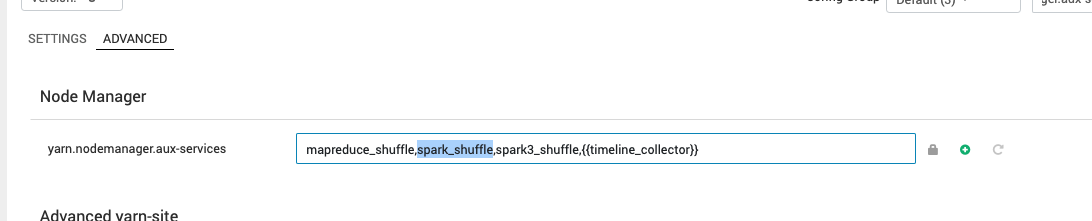
Remove the following from yarn configurations:
spark_shufflefromyarn.nodemanager.aux-services
Update 4
Remove the following from Custom yarn-site:
yarn.nodemanager.aux-services.spark2_shuffle.class
yarn.nodemanager.aux-services.spark2_shuffle.classpath
yarn.nodemanager.aux-services.spark_shuffle.classpath
yarn.nodemanager.aux-services.spark_shuffle.class
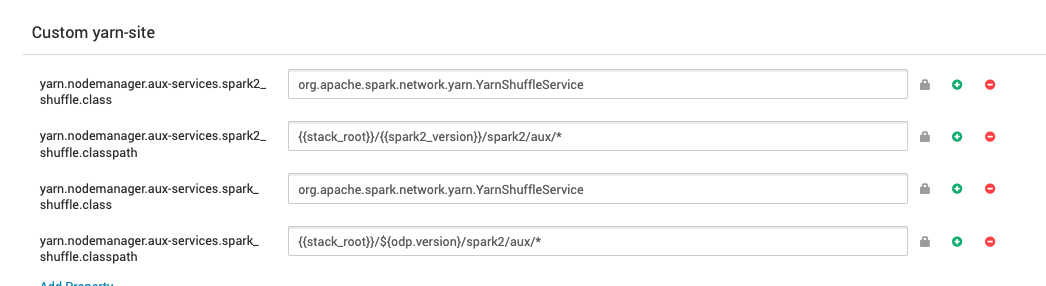
Remove all these configurations and save it.
Have a suggestion?