
Jupyterhub with Multi Spark and Additional Kernals
Until now, JupyterHub has supported only a single kernel, i.e., IPython, which primarily enables Python-based workflows. Running other technologies or connecting to services such as ODP Spark required additional prerequisites and manual configuration steps, as described here: Documentation for Spark Notebook Examples.
This release introduces improvements aimed at simplifying and expanding the JupyterHub experience by providing additional kernels that support multiple languages, connectors, libraries, and frameworks. This documentation/task specifically focuses on the addition of these new kernels.
Navigation
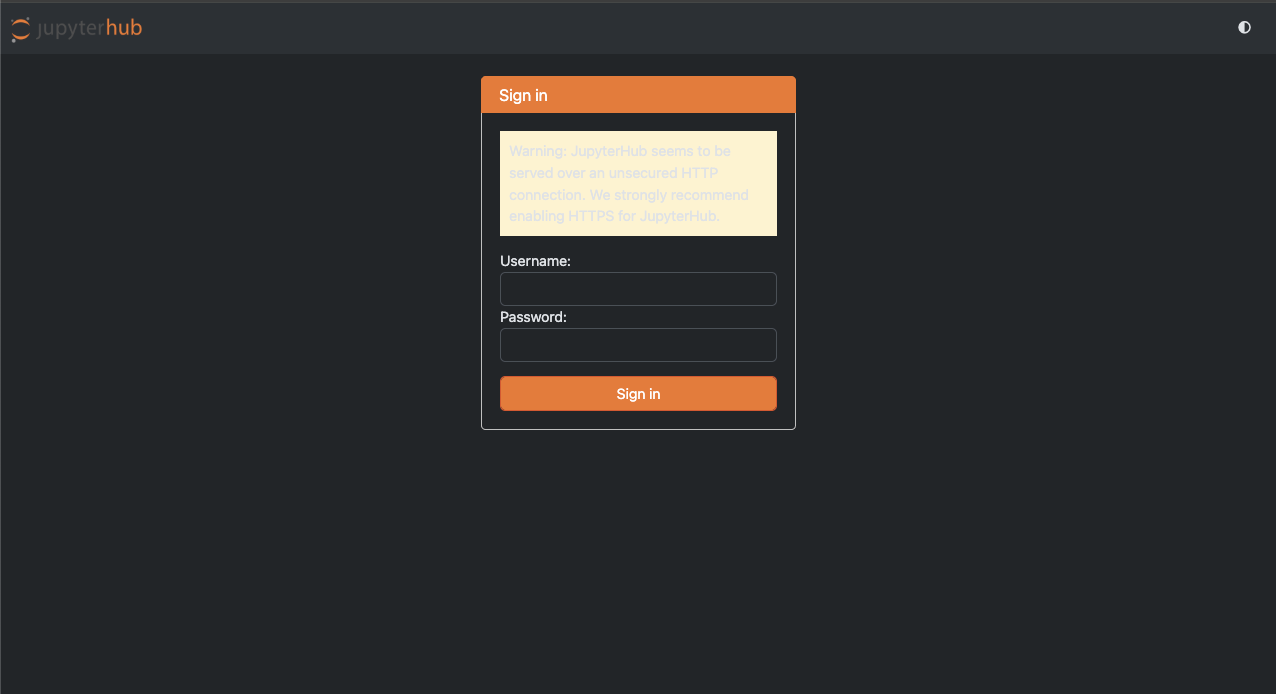
- Login to Jupyterhub.
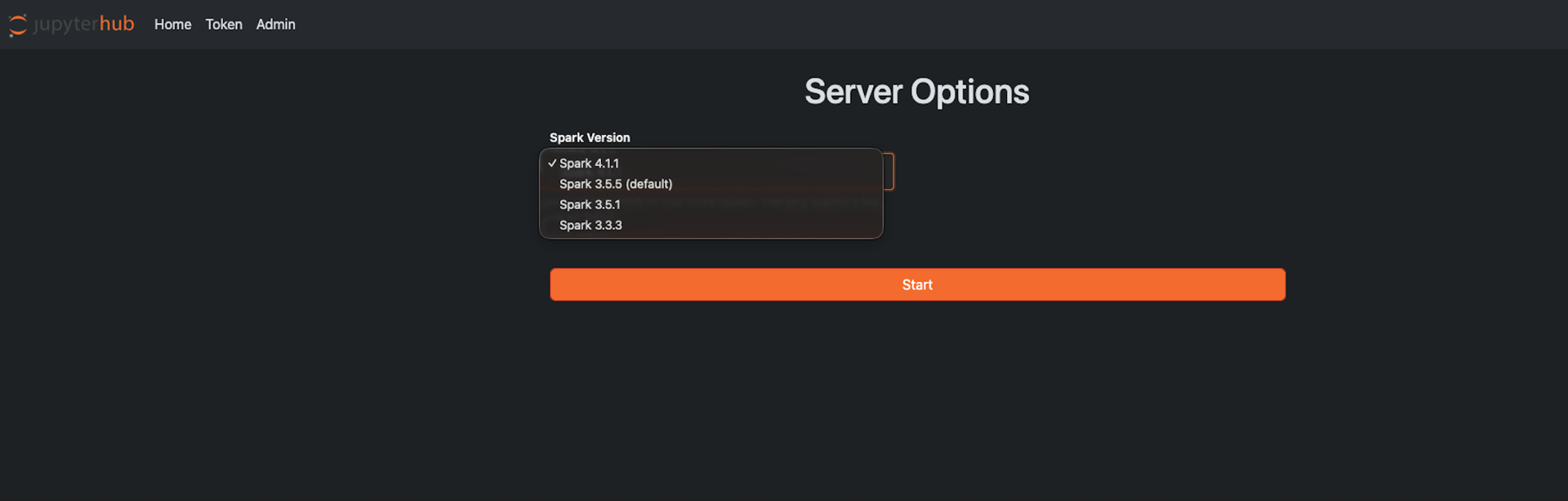
- Select the Spark version.
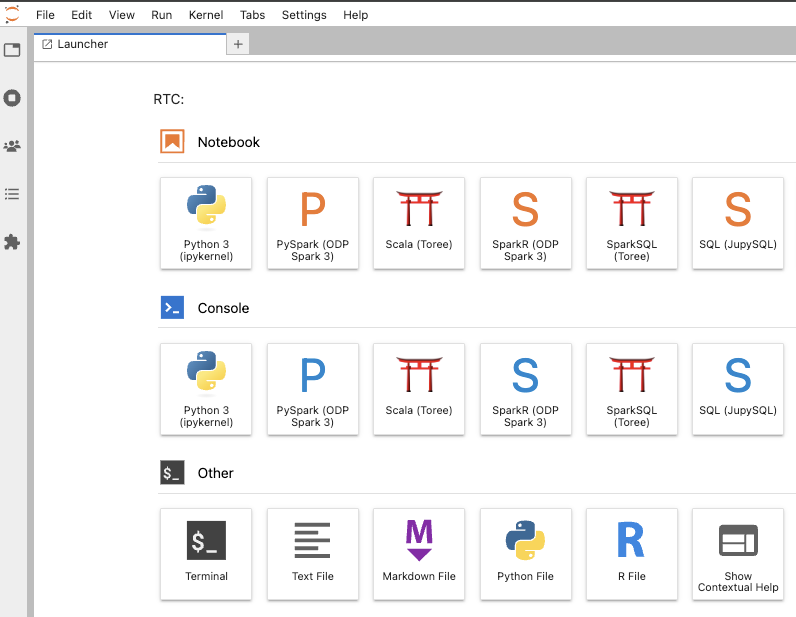
- The Launcher UI is displayed with Notebooks, Consoles and other configurations.
Limitation
Kernel support with Spark 4 is currently limited. While PySpark and SparkR kernels are fully supported and function as expected, the Scala kernel in JupyterHub is currently known to be incompatible with Spark 4. Support for the Scala kernel with Spark 4 will be addressed in a future release.
Kernels / Interpreters
The following kernels are available in JupyterHub and can be used with the selected ODP Spark 3 environment (with Spark 4 support coming soon) after the user logs in.
PySpark
Example Job:
from pyspark.sql import SparkSession
import random

# create / get spark session
spark = SparkSession.builder.appName("PiCalculator").getOrCreate()
sc = spark.sparkContext

# number of random points
NUM_SAMPLES = 1_000_000

def inside(_):
 x = random.random()
 y = random.random()
 return 1 if x*x + y*y <= 1 else 0

# parallelize and compute
count = sc.parallelize(range(NUM_SAMPLES)).map(inside).reduce(lambda a, b: a + b)

pi = 4.0 * count / NUM_SAMPLES
print("Pi is roughly:", pi)

print(spark.version)
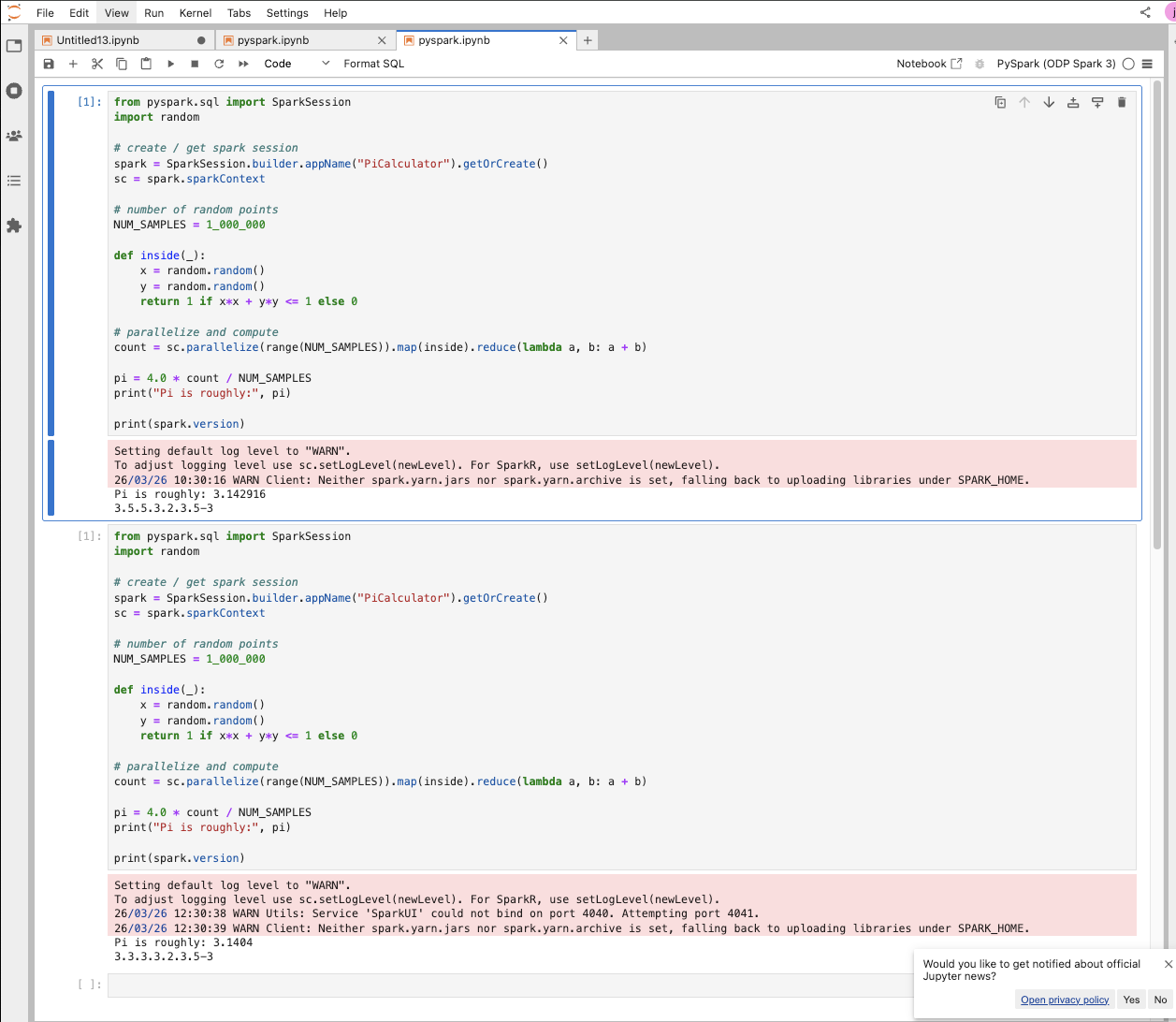
The following screenshot shows the output from the above run. As shown, different Spark versions were printed because the user stopped the server and restarted it after switching the Spark version.
Example Runs:
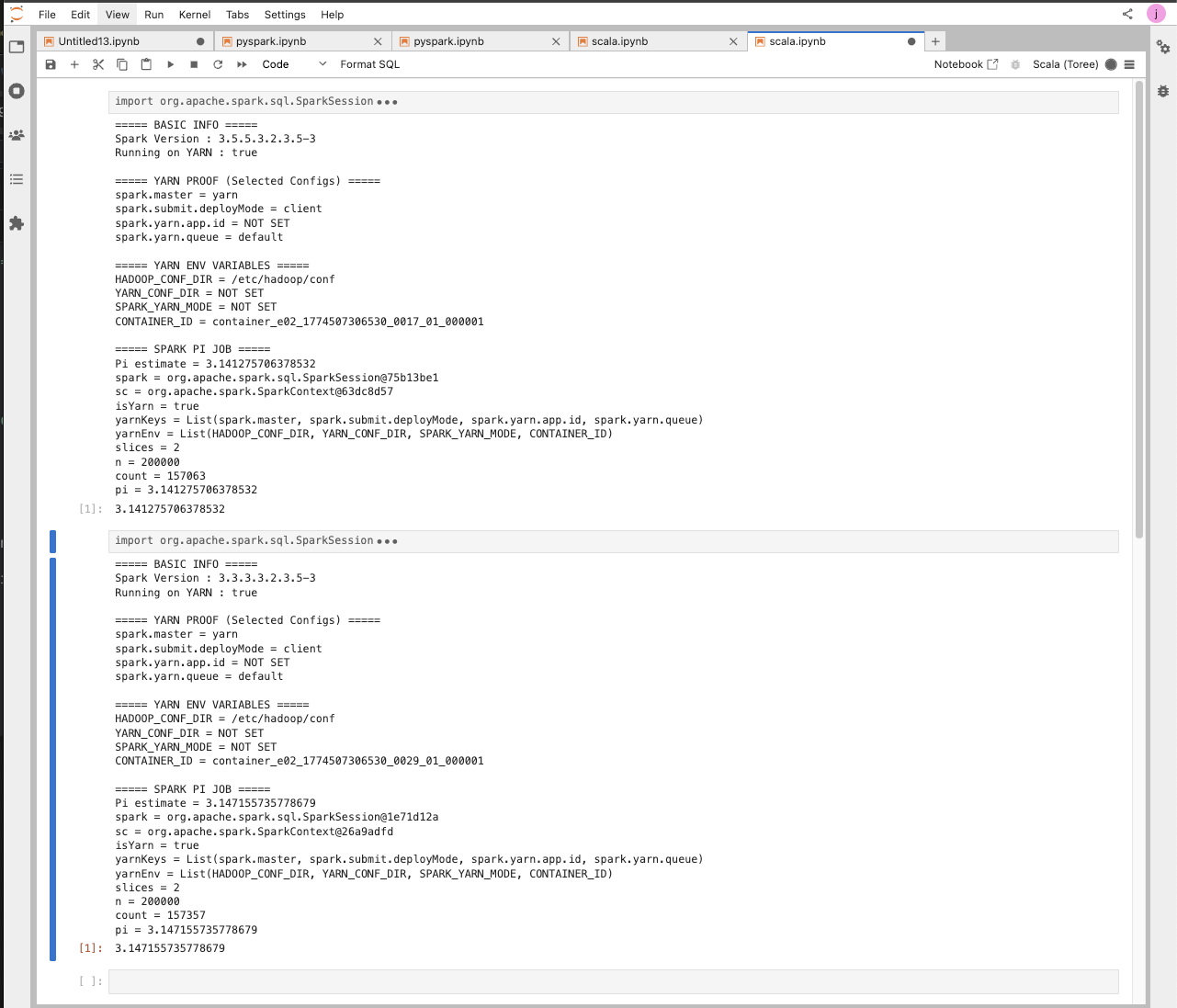
Scala Spark
Example Job:
import org.apache.spark.sql.SparkSession
import scala.util.Random

val spark = SparkSession.builder().getOrCreate()
val sc = spark.sparkContext

println("===== BASIC INFO =====")
println(s"Spark Version : ${sc.version}")

// Detect deploy mode
val isYarn = sc.master.startsWith("yarn") ||
 sc.getConf.get("spark.master", "").contains("yarn")

println(s"Running on YARN : $isYarn")

println("\n===== YARN PROOF (Selected Configs) =====")
val yarnKeys = Seq(
 "spark.master",
 "spark.submit.deployMode",
 "spark.yarn.app.id",
 "spark.yarn.queue"
)

yarnKeys.foreach { key =>
 val value = sc.getConf.getOption(key).getOrElse("NOT SET")
 println(s"$key = $value")
}

println("\n===== YARN ENV VARIABLES =====")
val yarnEnv = Seq(
 "HADOOP_CONF_DIR",
 "YARN_CONF_DIR",
 "SPARK_YARN_MODE",
 "CONTAINER_ID"
)

yarnEnv.foreach { key =>
 val value = sys.env.getOrElse(key, "NOT SET")
 println(s"$key = $value")
}

println("\n===== SPARK PI JOB =====")

val slices = 2
val n = math.min(100000L * slices, Int.MaxValue).toInt

val count = sc.parallelize(1 until n, slices).map { _ =>
 val x = Random.nextDouble()
 val y = Random.nextDouble()
 if (x*x + y*y <= 1) 1 else 0
}.reduce(_ + _)

val pi = 4.0 * count / (n - 1)

println(s"Pi estimate = $pi")
Example Runs:
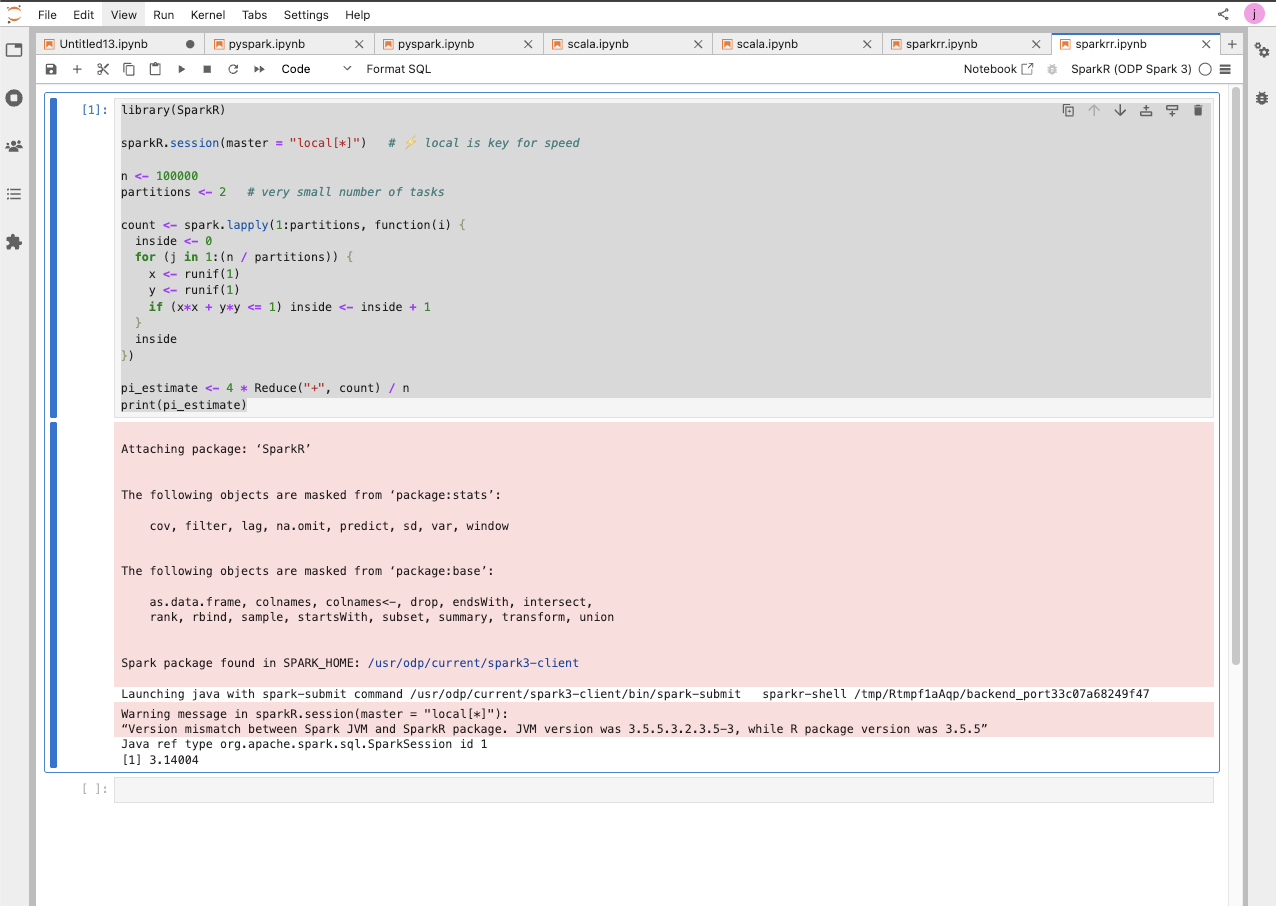
Spark R
Example Job:
library(SparkR)

sparkR.session(master = "local[*]")

n <- 100000
partitions <- 2 # very small number of tasks

count <- spark.lapply(1:partitions, function(i) {
 inside <- 0
 for (j in 1:(n / partitions)) {
 x <- runif(1)
 y <- runif(1)
 if (x*x + y*y <= 1) inside <- inside + 1
 }
 inside
})

pi_estimate <- 4 * Reduce("+", count) / n
print(pi_estimate)
Example Runs:
Spark SQL
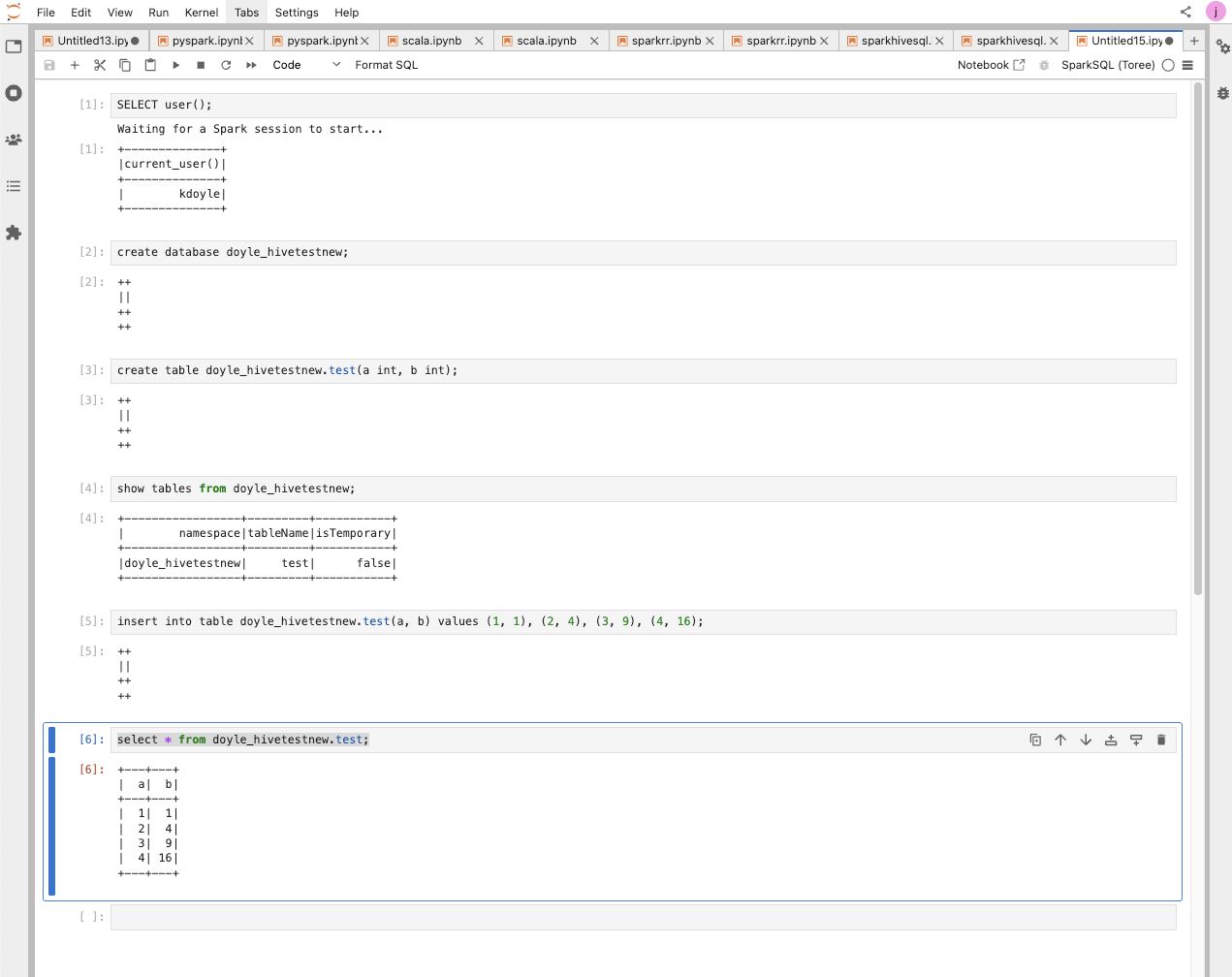
Example Jobs:
SELECT user();
create database doyle_hivetestnew;
create table doyle_hivetestnew.test(a int, b int);
show tables from doyle_hivetestnew;
insert into table doyle_hivetestnew.test(a, b) values (1, 1), (2, 4), (3, 9), (4, 16);
select * from doyle_hivetestnew.test;
Example Runs:
[root@newjupfin-0 ~]# beeline -u "jdbc:hive2://newjupfin-1.newjupfin.harshith.svc.cluster.local:10000/default" -n "kdoyle" -p "passw0rd"
Connecting to jdbc:hive2://newjupfin-1.newjupfin.harshith.svc.cluster.local:10000/default
Connected to: Apache Hive (version 3.1.4.3.2.3.5-3)
Driver: Hive JDBC (version 3.1.4.3.2.3.5-3)
Transaction isolation: TRANSACTION_REPEATABLE_READ
Beeline version 3.1.4.3.2.3.5-3 by Apache Hive
0: jdbc:hive2://newjupfin-1.newjupfin.harshit>
0: jdbc:hive2://newjupfin-1.newjupfin.harshit>
0: jdbc:hive2://newjupfin-1.newjupfin.harshit> select * from doyle_hivetestnew.test;
INFO : Compiling command(queryId=hive_20260330151157_87ca9eab-9dc4-43bd-99fc-d8ce18bd398b): select * from doyle_hivetestnew.test
INFO : No Stats for doyle_hivetestnew@test, Columns: a, b
INFO : Semantic Analysis Completed (retrial = false)
INFO : Created Hive schema: Schema(fieldSchemas:[FieldSchema(name:test.a, type:int, comment:null), FieldSchema(name:test.b, type:int, comment:null)], properties:null)
INFO : Completed compiling command(queryId=hive_20260330151157_87ca9eab-9dc4-43bd-99fc-d8ce18bd398b); Time taken: 0.117 seconds
INFO : Operation QUERY obtained 0 locks
INFO : Executing command(queryId=hive_20260330151157_87ca9eab-9dc4-43bd-99fc-d8ce18bd398b): select * from doyle_hivetestnew.test
INFO : Completed executing command(queryId=hive_20260330151157_87ca9eab-9dc4-43bd-99fc-d8ce18bd398b); Time taken: 0.002 seconds
+---------+---------+
| test.a | test.b |
+---------+---------+
| 1 | 1 |
| 2 | 4 |
| 3 | 9 |
| 4 | 16 |
+---------+---------+
4 rows selected (0.211 seconds)
0: jdbc:hive2://newjupfin-1.newjupfin.harshit>
0: jdbc:hive2://newjupfin-1.newjupfin.harshit> Closing: 0: jdbc:hive2://newjupfin-1.newjupfin.harshith.svc.cluster.local:10000/default
[root@newjupfin-0 ~]#
JupySQL
Trino
Create a connection.
import urllib3
urllib3.disable_warnings(urllib3.exceptions.InsecureRequestWarning)

%reload_ext sql
from sqlalchemy import create_engine

engine = create_engine(
 "trino://kdoyle:passw0rd@newjupfin-0.newjupfin.harshith.svc.cluster.local:9098/hive",
 connect_args={
 "http_scheme": "https",
 "verify": False
 }
)

%sql engine
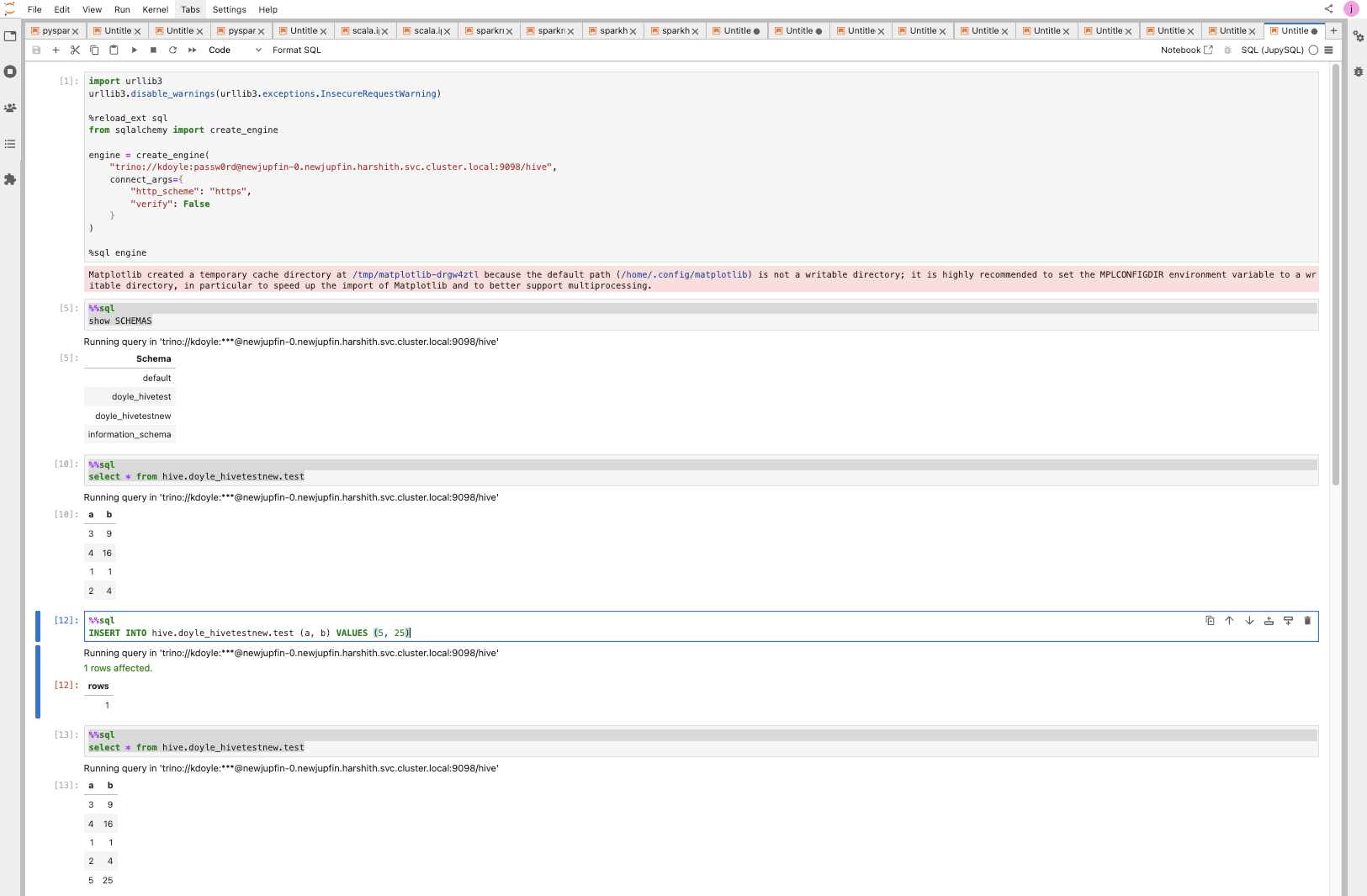
You should now be able to access a Trino SQL–like shell by simply adding %%sql at the top of each notebook cell, for example:
%%sql
show SCHEMAS

# ---- seperate cell ----#

%%sql
select * from hive.doyle_hivetestnew.test

# ---- seperate cell ----#

%%sql
INSERT INTO hive.doyle_hivetestnew.test (a, b) VALUES (5, 25)

# ---- seperate cell ----#

%%sql
select * from hive.doyle_hivetestnew.test
Example Run:
Info
This can be extended to any sqlalchemy compatible connector or database.
Have a suggestion?