
Configure Kafka Tiered-Storage with S3
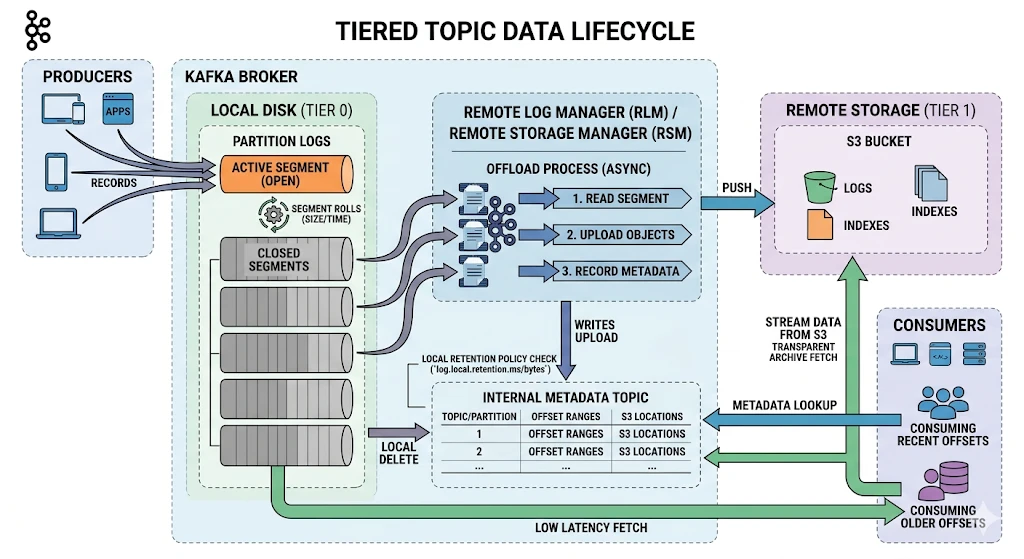
This page explains how to enable Kafka Tiered Storage, configure Ambari, and verify your setup. All environment-specific values are shown as placeholders — replace them with values from your environment before running any commands.
- Reference (KIP-405) KIP-405: Kafka Tiered Storage - Apache Kafka - Apache Software Foundation.
Info
Tiered storage with Kraft has not been certified.
Prerequisites
Tiered storage requires JDK 17 with Kafka 3. Kafka 3.7.2 supports JDK 17, so no Kafka rebuild is required.
export JAVA_HOME=/path/to/java-17-home
export PATH=$PATH:$JAVA_HOME/bin
Ambari Configuration Steps
kafka3-log4j
Info
To see detailed segment offloading logs, configure the above loggers to DEBUG. Configure only if detailed logs are required.
log4j.logger.kafka.log.remote=DEBUG
log4j.logger.io.aiven.kafka.tieredstorage=DEBUG
kafka3-broker.xml
<!-- Remote Log Metadata Manager -->
remote.log.metadata.manager.bootstrap.servers=<BOOTSTRAP_SERVERS>
remote.log.metadata.manager.class.name=org.apache.kafka.server.log.remote.metadata.storage.TopicBasedRemoteLogMetadataManager
remote.log.metadata.manager.listener.name=PLAINTEXT <!-- Available options: PLAINTEXT, SASL_PLAINTEXT, SASL_SSL, SSL -->
remote.log.metadata.manager.security.protocol=PLAINTEXT <!-- Available options: PLAINTEXT, SASL_PLAINTEXT, SASL_SSL, SSL -->
<!-- RSM Aiven Tiered Storage -->
remote.log.storage.system.enable=true
remote.log.storage.manager.class.name=io.aiven.kafka.tieredstorage.RemoteStorageManager
remote.log.storage.manager.class.path=/usr/odp/current/kafka3-broker/rsm/core/*:/usr/odp/current/kafka3-broker/rsm/<storage-option>/*
<!-- Available storage options: s3, azure (will be added), gcp (will be added) -->
remote.log.storage.manager.impl.prefix=rsm.config.
<!-- RLMM client -->
rlmm.config.remote.log.metadata.common.client.bootstrap.servers=<BOOTSTRAP_SERVERS>
rlmm.config.remote.log.metadata.common.client.security.protocol=PLAINTEXT <!-- Available options: PLAINTEXT, SASL_PLAINTEXT, SASL_SSL, SSL -->
rlmm.config.remote.log.metadata.common.client.sasl.mechanism=GSSAPI
rlmm.config.remote.log.metadata.common.client.sasl.kerberos.service.name=kafka
rlmm.config.remote.log.metadata.topic.replication.factor=3
<!-- S3 / Object Store Backend -->
rsm.config.chunk.size=419430
rsm.config.storage.backend.class=io.aiven.kafka.tieredstorage.storage.s3.S3Storage
rsm.config.storage.s3.bucket.name=<S3_BUCKET_NAME>
rsm.config.storage.s3.endpoint.url=<S3_ENDPOINT_URL>
rsm.config.storage.s3.region=<S3_REGION>
rsm.config.key.prefix=<S3_KEY_PREFIX>
rsm.config.storage.s3.protocol=http <!-- Available options: http/https -->
rsm.config.storage.s3.force_http=true <!-- Available options: true/false -->
rsm.config.storage.s3.path.style.access=true
rsm.config.storage.s3.path.style.access.enabled=true
- After restarting the Kafka Broker, you must see this message in the Kafka Broker logs:
INFO Initialized topic-based RLMM resources successfully (org.apache.kafka.server.log.remote.metadata.storage.TopicBasedRemoteLogMetadataManager)
Credentials Configuration with jceks
- Run the below commands to store access/secret keys in the kafka3 jceks file.
- Run on all broker nodes.
- remote.log.storage.system.enable=true must be set to enable Kafka3-env to export access/secret keys.
# Access key
<JAVA_HOME>/bin/java -cp "/var/lib/ambari-agent/cred/lib/*" \
org.apache.ambari.server.credentialapi.CredentialUtil \
-provider "jceks://file/etc/security/credential/kafka3.jceks" \
create "fs.s3a.access.key" -value "AWS_ACCESS_KEY_ID"
# Secret key
<JAVA_HOME>/bin/java -cp "/var/lib/ambari-agent/cred/lib/*" \
org.apache.ambari.server.credentialapi.CredentialUtil \
-provider "jceks://file/etc/security/credential/kafka3.jceks" \
create "fs.s3a.secret.key" -value "AWS_SECRET_ACCESS_KEY"
# Verify the credential list
hadoop credential list -provider jceks://file/etc/security/credential/kafka3.jceks
Create a Tiered Topic
- Create the topic.
<KAFKA_BIN>/kafka-topics.sh --bootstrap-server <BOOTSTRAP_SERVERS> \
--create --topic <TIERED_TOPIC> \
--config local.retention.bytes=134217728 \
--config local.retention.ms=1000 \
--config segment.bytes=134217728 \
--config remote.storage.enable=true
Config | Description |
|---|---|
local.retention.bytes | Maximum bytes retained locally on the broker before offloading to remote storage (128 MB) |
local.retention.ms | How long segments are kept locally before being eligible for offload (1000 ms) |
segment.bytes | Size at which a log segment is rolled and becomes a candidate for offload (128 MB) |
remote.storage.enable | Enables tiered storage for this topic |
Info
All configuration values above are intentionally set to minimal sizes for testing purposes, to trigger segment rolling and offloading as quickly as possible.
- Produce test data
<KAFKA_BIN>/kafka-producer-perf-test.sh \
--topic <TIERED_TOPIC> \
--num-records 10000000 \
--record-size 1000 \
--throughput -1 \
--producer-props \
bootstrap.servers=<BOOTSTRAP_SERVERS> \
acks=1 \
linger.ms=50 \
batch.size=131072 \
buffer.memory=67108864
Config | Description |
|---|---|
num-records | Total number of records to produce |
record-size | Size of each record in bytes (1 KB) |
throughput | Produce as fast as possible |
acks | Leader acknowledgment only then send |
linger.ms | Waits up to 50ms to batch records before sending |
batch.size | Maximum batch size per send (128 KB) |
buffer.memory | Total producer buffer memory (64 MB) |
- Verify offload to object storage
aws s3 ls --endpoint-url <OBJECT_STORE_ENDPOINT> s3://<S3_BUCKET_NAME>/<TIERED_TOPIC>-<TOPIC_UUID>/0/
# Example results
2026-03-18 13:18:08 139246 00000000000000000000-<SEGMENT_ID>.indexes
2026-03-18 13:18:08 1073695167 00000000000000000000-<SEGMENT_ID>.log
2026-03-18 13:18:08 748 00000000000000000000-<SEGMENT_ID>.rsm-manifest
Info
It might take some time for Kafka to offload the cold data.
- Verify that the data gets deleted locally.
# Verify local log cleanup: local log size should drop after offload
du -sh <KAFKA_LOG_DIR>/<TIERED_TOPIC>*
# Example: after generating ~16 GB, only a few KB remain locally
24K <KAFKA_LOG_DIR>/<TIERED_TOPIC>-0
- Consume the data from object storage
<KAFKA_BIN>/kafka-console-consumer.sh \
--bootstrap-server <BOOTSTRAP_SERVERS> \
--topic <TIERED_TOPIC> \
--from-beginning
Troubleshooting
Error Running Brokers After Disabling Tiered Storage While Tiered Storage Exists
[2026-04-22 21:06:53,154] ERROR Exiting Kafka due to fatal exception during startup. (kafka.Kafka$)
org.apache.kafka.common.config.ConfigException: You have to delete all topics with the property remote.storage.enable=true before disabling tiered storage cluster-wide
at org.apache.kafka.storage.internals.log.LogConfig.validateRemoteStorageOnlyIfSystemEnabled(LogConfig.java:566)
at kafka.log.LogManager.updateTopicConfig(LogManager.scala:973)
at kafka.server.TopicConfigHandler.updateLogConfig(ConfigHandler.scala:74)
at kafka.server.TopicConfigHandler.processConfigChanges(ConfigHandler.scala:95)
at kafka.server.ZkConfigManager.$anonfun$startup$4(ZkConfigManager.scala:177)
at kafka.server.ZkConfigManager.$anonfun$startup$4$adapted(ZkConfigManager.scala:176)
at scala.collection.immutable.HashMap.foreach(HashMap.scala:1115)
at kafka.server.ZkConfigManager.$anonfun$startup$1(ZkConfigManager.scala:176)
at kafka.server.ZkConfigManager.$anonfun$startup$1$adapted(ZkConfigManager.scala:167)
at scala.collection.immutable.HashMap.foreach(HashMap.scala:1115)
at kafka.server.ZkConfigManager.startup(ZkConfigManager.scala:167)
at kafka.server.KafkaServer.startup(KafkaServer.scala:619)
at kafka.Kafka$.main(Kafka.scala:112)
at kafka.Kafka.main(Kafka.scala)
- Root cause: All Kafka topics with the remote.storage.enable=true property should be deleted before disabling Tiered Storage. This is a known limitation.
- Forced Solution: Run Brokers with Tiered Storage enabled, then delete the topics
/usr/odp/<ODP-version>/kafka3/bin/kafka-topics.sh --delete \
--topic <topic-name> \
--bootstrap-server `hostname -i`:6669