
Deploy Pulse Add-on Services
You can deploy Pulse add-on services such as Kafka Connector, Impala Connector, Anomaly Detection, YARN Optimizer, etc., directly from the Pulse Admin UI based on your monitoring needs.
These add-on services pull and process data from databases and agents, and display the results in the Pulse UI for observability and analysis.
For the list of available add-on services, see Pulse Add-on Services.
Steps
- Open the Cluster
- In the Pulse Admin UI, go to Home.
- Click the name of the configured cluster you want to manage.
- Access Add-on Services
- On the Cluster Details page, under the Overview tab, scroll down to the Add-ons section.
- You’ll see a list of available add-on services.
- Deploy the Add-on
- Click the “+” icon next to an add-on service to start deployment.
- You can click “+” for multiple add-on services
- Then, click Install to deploy all selected services at once.
- Once the deployment completes successfully, the service status changes to Running.
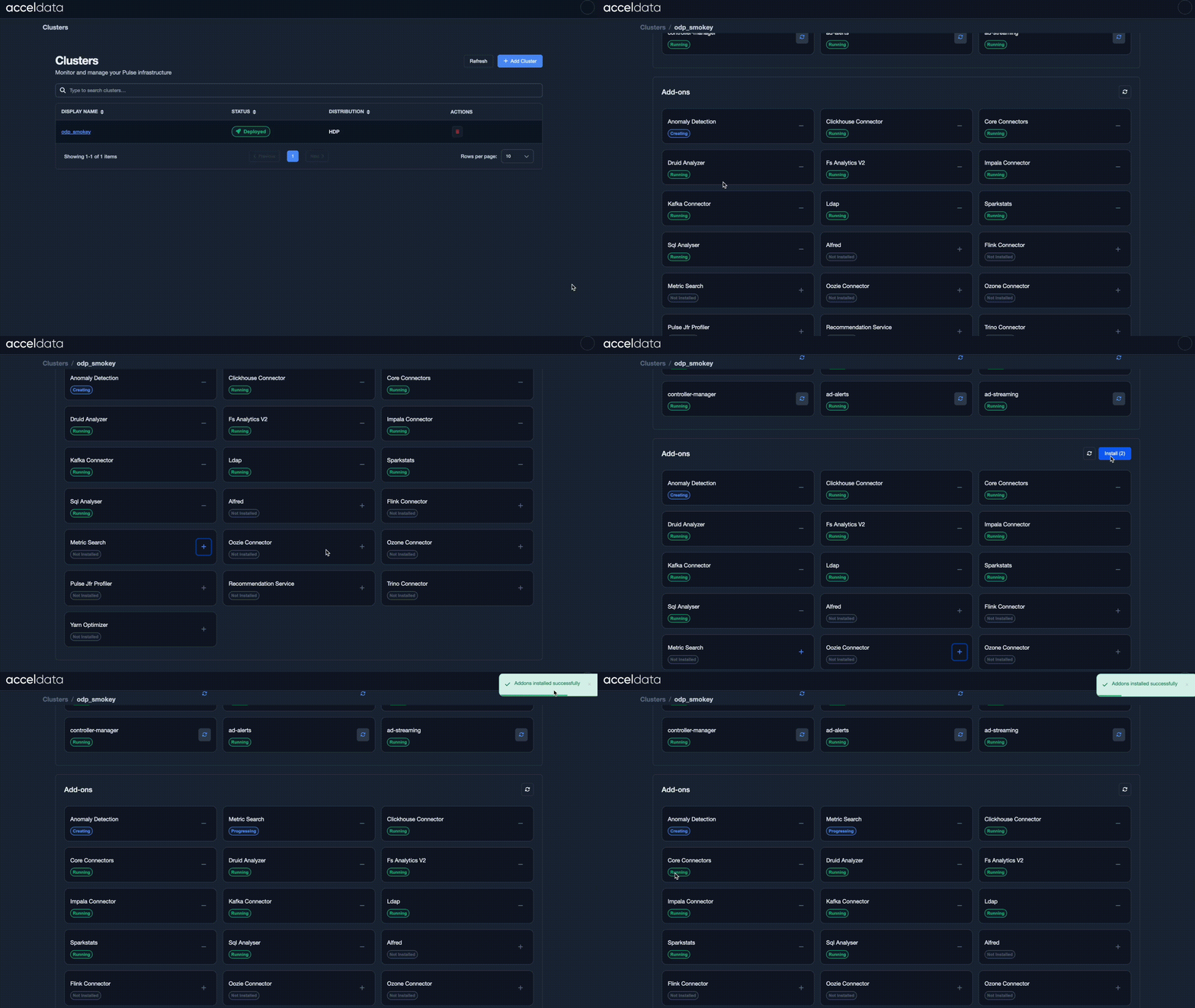
You can deploy multiple add-on services as needed. Each add-on enhances Pulse observability by enabling data collection and insights for a particular service.