
Enable Encryption at Rest for Kudu
This page describes how to enable encryption at rest for Kudu. Kudu supports data encryption at rest using Ranger KMS.
Steps to Enable Encryption
- Enable the enable_kms option in the Kudu Mpack.
- Create an encryption key in Ranger before installing the Kudu Mpack.
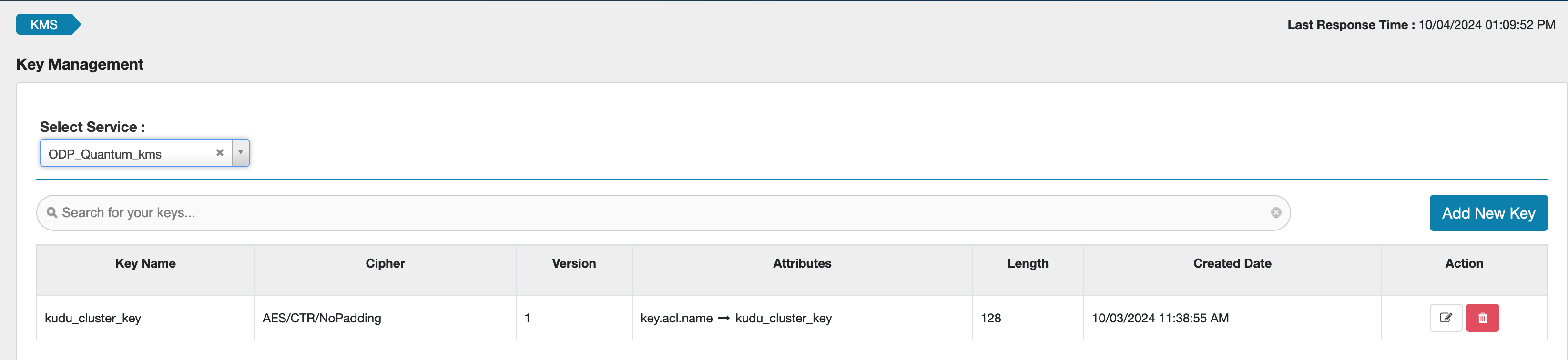
- Set ranger_kms_key_name to the name of the key you created in Ranger.

Example KMS key:
Additional Configuration
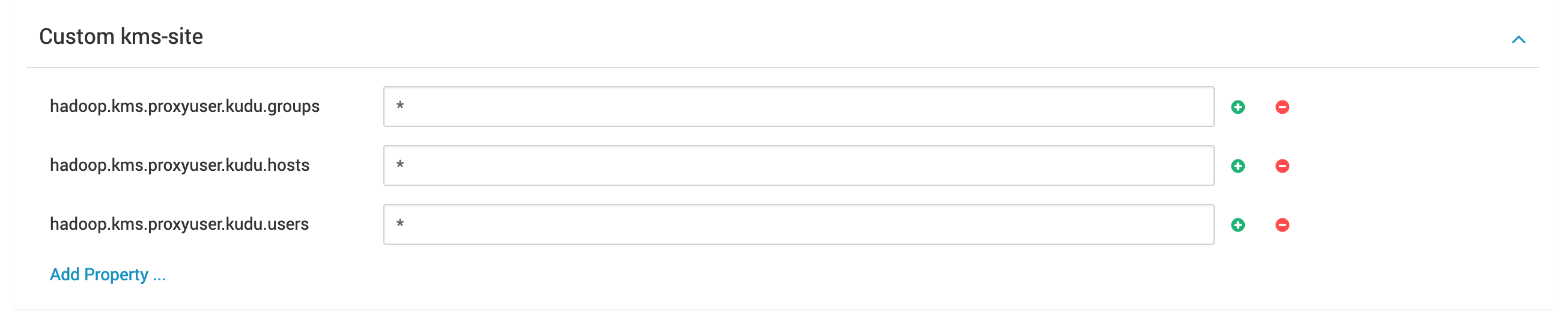
- Update the kms-site properties in Ranger KMS to include settings required for Kudu.
- Update or add a Ranger KMS policy to allow the kudu user access to the generated key.
Encryption in Motion
Data encryption in transit is supported through the rpc_encryption option, which is enabled by default when Kerberos is enabled.
Limitations
- Encryption at rest is only supported on newly created clusters.
- Enabling it on a cluster with existing data will cause Kudu servers to fail to start.
- Disabling encryption on an existing cluster is not supported.