
Airflow DagRuns
You can navigate to the left navigation menu on the Pulse UI and select Airflow > DagRuns. The Airflow DagRuns list appears with the following functionalities to analyze the details.
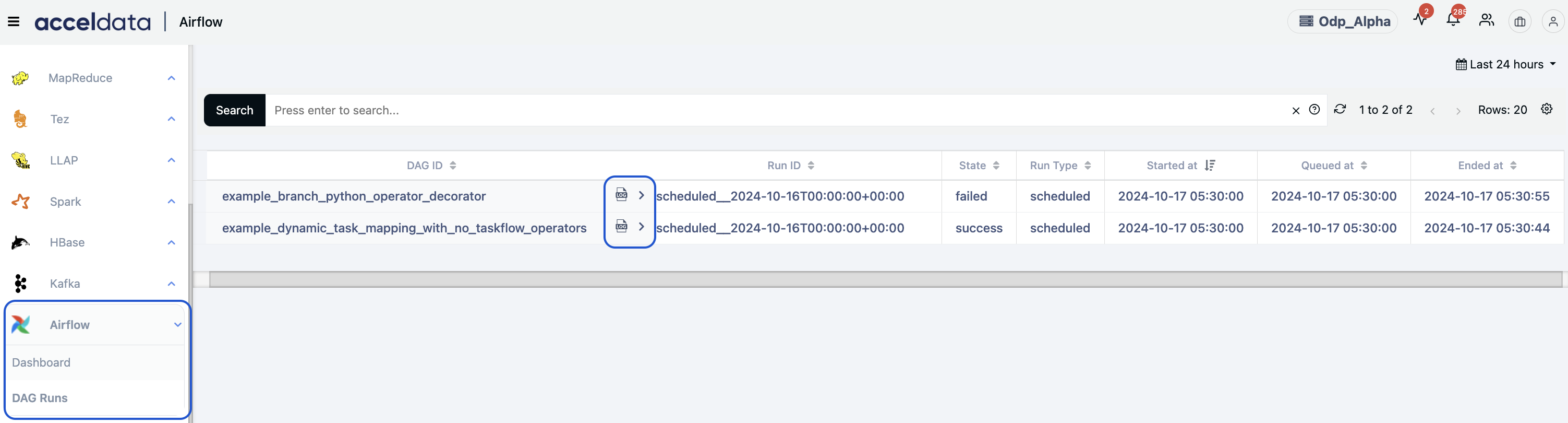
Functionality | Description |
|---|---|
Global calendar | Use the Global calendar icon to select a time period (For example, Today, Last 12 hours, Last 3 Months, etc.) or choose a custom time period and click Apply. |
Search bar | Use the Search filter option to display data for the selected metrics only. |
Settings | Use the Settings option to select or unselect the metrics to appear in the results. |
The following metrics with details are displayed to analyze the data.
Name | Description |
|---|---|
DAG ID | The ID of the DAG. |
Run ID | The DAG’s Run ID. |
State | The current status of the DAG. |
Run Type | Shows the DAG Run type. For example, manual, scheduled, etc. |
Started at | The time at which the DAG started executing its tasks. |
Queued at | The time at which the DAG is pushed into the queue state. |
Ended at | The date beyond which your DAG won’t run. |
You can navigate and click on each Dag ID to see the details of the Dag Tasks.
Example task states: Queued, Running, Completed, etc.
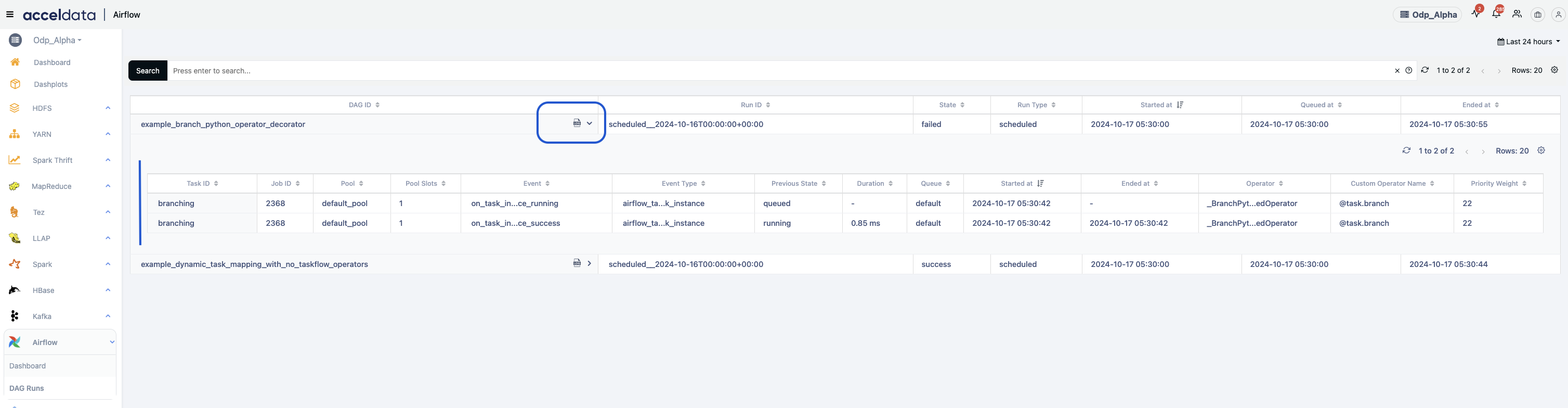
Name | Description |
|---|---|
Task ID | The ID of the Task running. |
Job ID | The incremental number for the respective DAG ID. |
Pool | The number of slots available in the Pool. |
Pool Slots | The number of slots available for the task to run. |
Event | The different types of listener events. |
Event Type | The example event types are dag_run_instance, task_run_instance, etc. |
Previous State | The previous state of DAG before entering into the current state. Example: Flow: Run >Queue>Completed Current State: Queue Previous State: Run |
Duration | The time duration taken to complete the current state. |
Queue | Queue allows you to direct tasks to specific workers or groups of workers based on the queue they are assigned to. |
Started at | The task started time. |
Ended at | The task ended time. |
Operator | The operator details that define the actions or tasks executed within a DAG. ex: PythonOperator, BashOperator, etc. |
Custom Operator Name | The specific name defines a class that extends Airflow's BaseOperator or any other class as needed. Example: @Task |
Priority Weight | Assign a parameter to tasks within a DAG that influences the order in which the tasks are executed when resources (like worker slots) are limited. |