
Pre-requisites for Configuration Backup
Create a Separate Database and Store Configs (Recommended)
Pre-upgrade
Before proceeding with the upgrade, ensure to execute the following command:
create database service_conf_bck;
use service_conf_bck;
CREATE TABLE IF NOT EXISTS configs_prior_patch AS
SELECT
cc.config_id,
cc.type_name,
cc.config_data,
cc.config_attributes,
service_name,
sc.version,
sc.note,
(SELECT MAX(version) FROM ambari.serviceconfig s
WHERE s.service_name = sc.service_name) AS max_version
FROM
ambari.serviceconfig sc
INNER JOIN
ambari.serviceconfigmapping scm
ON
sc.service_config_id = scm.service_config_id
INNER JOIN
ambari.clusterconfig cc
ON
cc.config_id = scm.config_id
WHERE
sc.service_name IN (<service-name-1>,<service-name-2>,.....);
Post-upgrade
After completing the upgrade, to restore the configurations for a specific service, execute the following code:
update clusterconfig a set config_data = (select config_data from service_conf_bck.configs_prior_patch b where a.type_name = b.type_name and version = (SELECT MAX(version) FROM service_conf_bck.configs_prior_patch WHERE service_name = <service-name>) and service_name = <service-name>),
config_attributes = (select config_attributes from service_conf_bck.configs_prior_patch b where a.type_name = b.type_name and version = (SELECT MAX(version) FROM serviceconfig WHERE service_name = <service-name>) and service_name = <service-name>)
where config_id in (select config_id from serviceconfigmapping where service_config_id in (select service_config_id from serviceconfig where service_name = <service-name> and version =
(select max(version) from serviceconfig where service_name = <service-name>)) );
For example, in the below code we have taken a backup for configurations of NiFi, Tez, and Spark3:
create service_conf_bck;
use service_conf_bck;
CREATE TABLE IF NOT EXISTS configs_prior_patch AS
SELECT
cc.config_id,
cc.type_name,
cc.config_data,
cc.config_attributes,
service_name,
sc.version,
sc.note,
(SELECT MAX(version) FROM ambari.serviceconfig s
WHERE s.service_name = sc.service_name) AS max_version
FROM
ambari.serviceconfig sc
INNER JOIN
ambari.serviceconfigmapping scm
ON
sc.service_config_id = scm.service_config_id
INNER JOIN
ambari.clusterconfig cc
ON
cc.config_id = scm.config_id
WHERE
sc.service_name IN ('NIFI','TEZ','SPARK3');
After the upgrade, to restore NIFI configurations, the following command was run in mysql:
update clusterconfig a set config_data = (select config_data from service_conf_bck.configs_prior_patch b where a.type_name = b.type_name and version = (SELECT MAX(version) FROM service_conf_bck.configs_prior_patch WHERE service_name = 'NIFI') and service_name = 'NIFI'),
config_attributes = (select config_attributes from service_conf_bck.configs_prior_patch b where a.type_name = b.type_name and version = (SELECT MAX(version) FROM serviceconfig WHERE service_name = 'NIFI') and service_name = 'NIFI')
where config_id in (select config_id from serviceconfigmapping where service_config_id in (select service_config_id from serviceconfig where service_name = 'NIFI' and version =
(select max(version) from serviceconfig where service_name = 'NIFI')) );
Create Database and Store Configs (FYI)
- Run the following command before upgrade:
create table configs_prior_patch_<service-name> as
select cc.config_id,cc.type_name,cc.config_data ,cc.config_attributes ,service_name,sc.version,sc.note from serviceconfig sc inner join serviceconfigmapping scm
on sc.service_config_id =scm.service_config_id inner join clusterconfig cc on cc.config_id = scm.config_id
where sc.service_name in (<service-name>);
- On completion of the upgrade, to restore the configurations, run the following code:
update clusterconfig a set config_data = (select config_data from configs_prior_patch_nifi b where a.type_name = b.type_name and version = <latest-config-version-before-upgrade> and service_name = <service-name>),
config_attributes = (select config_attributes from configs_prior_patch_nifi b where a.type_name = b.type_name and version = <latest-config-version-before-upgrade> and service_name = <service-name>)
where config_id in (select config_id from serviceconfigmapping where service_config_id in (select service_config_id from serviceconfig where service_name = <service-name> and version =
(select max(version) from serviceconfig where service_name = <service-name>)) );
Example for service-name: NIFI with latest-config-version-before-upgrade:4
Before Upgrade:
create table configs_prior_patch_nifi as
select cc.config_id,cc.type_name,cc.config_data ,cc.config_attributes ,service_name,sc.version,sc.note from serviceconfig sc inner join serviceconfigmapping scm
on sc.service_config_id =scm.service_config_id inner join clusterconfig cc on cc.config_id = scm.config_id
where sc.service_name in ('NIFI');
After Upgrade
update clusterconfig a set config_data = (select config_data from configs_prior_patch_nifi b where a.type_name = b.type_name and version = 4 and service_name = 'NIFI'),
config_attributes = (select config_attributes from configs_prior_patch_nifi b where a.type_name = b.type_name and version = 4 and service_name = 'NIFI')
where config_id in (select config_id from serviceconfigmapping where service_config_id in (select service_config_id from serviceconfig where service_name = 'NIFI' and version =
(select max(version) from serviceconfig where service_name = 'NIFI')) );
Stop and Delete Mpack Managed Services
Stop all the Mpack managed services and delete it from Ambari.
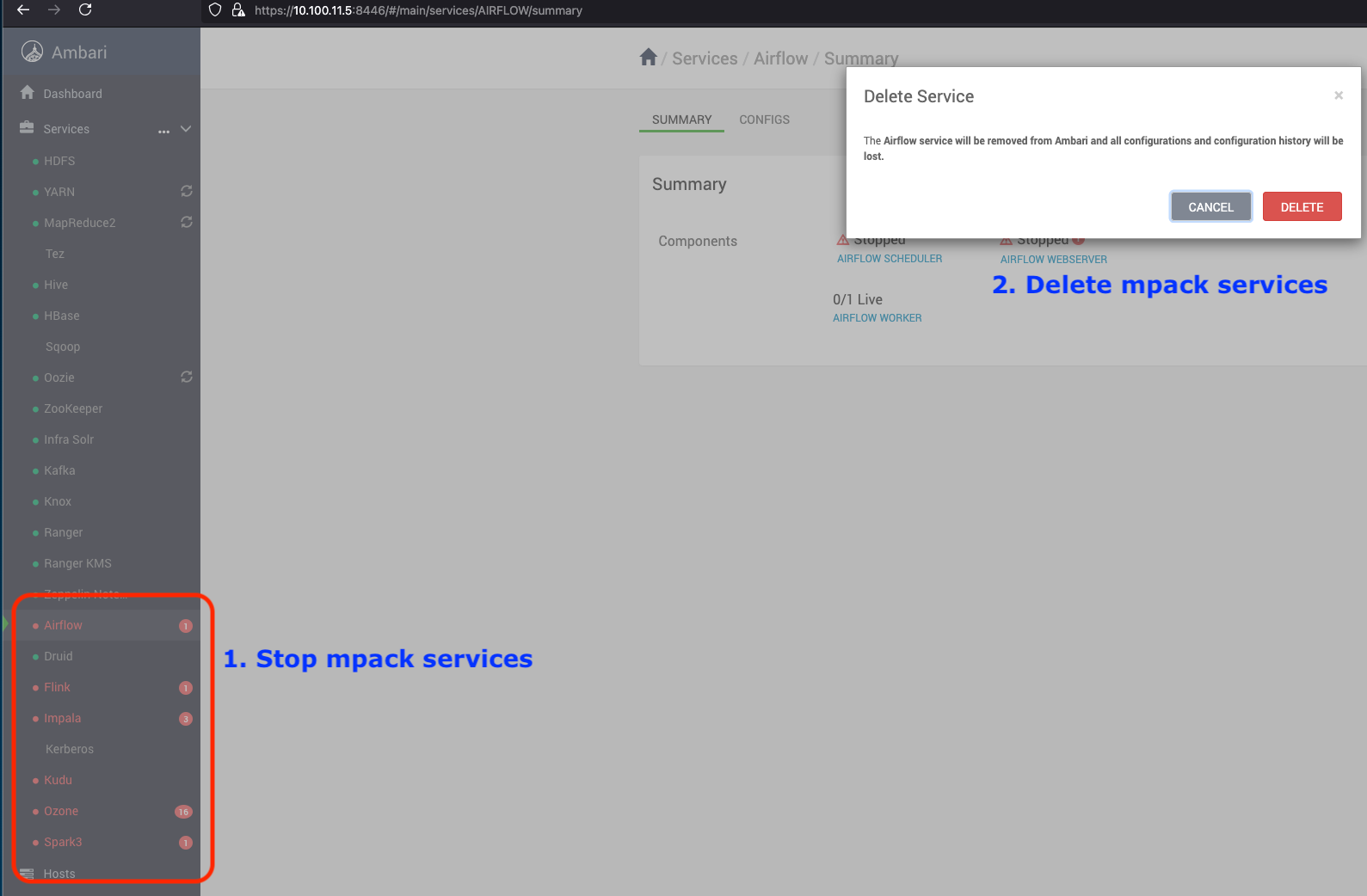
After deleting the Mpack managed services, uninstall the Mpacks.
Uninstall Mpacks
Run the following commands to uninstall Mpacks.
ambari-server uninstall-mpack --mpack=ambari-impala-mpack
ambari-server uninstall-mpack --mpack-name=flink-ambari-mpack
ambari-server uninstall-mpack --mpack-name=spark3-ambari-3.5.1.mpack
ambari-server uninstall-mpack --mpack-name=ozone-ambari.mpack
ambari-server uninstall-mpack --mpack-name=airflow-ambari-mpack
ambari-server uninstall-mpack --mpack=kudu-ambari-mpack
#<Same applies for respective mpacks>
Restart Ambari Server
ambari-server restart
For additional validation, perform the following steps to ensure the packages have been completely uninstalled from the local server.
Remove Mpack Service Packages Installed on Servers
Remove Impala
Follow the steps below to remove and uninstall packages locally from the server without affecting dependent packages. Repeat these steps for all mpack-based services:
For example, remove Impala on RHEL.
- Run the following command to list the Impala binaries installed on the server.
rpm -qa | grep impala #for RHEL
dpkg -l | grep impala #for Ubuntu
impala-server-4.1.2.3.3.6.1-1.x86_64
impala-shell-4.1.2.3.3.6.1-1.x86_64
impala-state-store-4.1.2.3.3.6.1-1.x86_64
impala-catalog-4.1.2.3.3.6.1-1.x86_64
impala-4.1.2.3.3.6.1-1.x86_64
- Remove the listed installed packages without removing the dependencies.
rpm -e --nodeps impala-server-4.1.2.3.3.6.1-1.x86_64 impala-shell-4.1.2.3.3.6.1-1.x86_64 impala-state-store-4.1.2.3.3.6.1-1.x86_64 impala-catalog-4.1.2.3.3.6.1-1.x86_64 impala-4.1.2.3.3.6.1-1.x86_64 # for RHEL
dpkg --purge impala-server impala-shell impala-state-store impala-catalog impala # for Ubuntu
- Run the following command to validate the same.
rpm -qa | grep impala #for RHEL
dpkg -l | grep impala #for Ubuntu
- Perform the above steps for all the mpack based installed services on their respective servers.
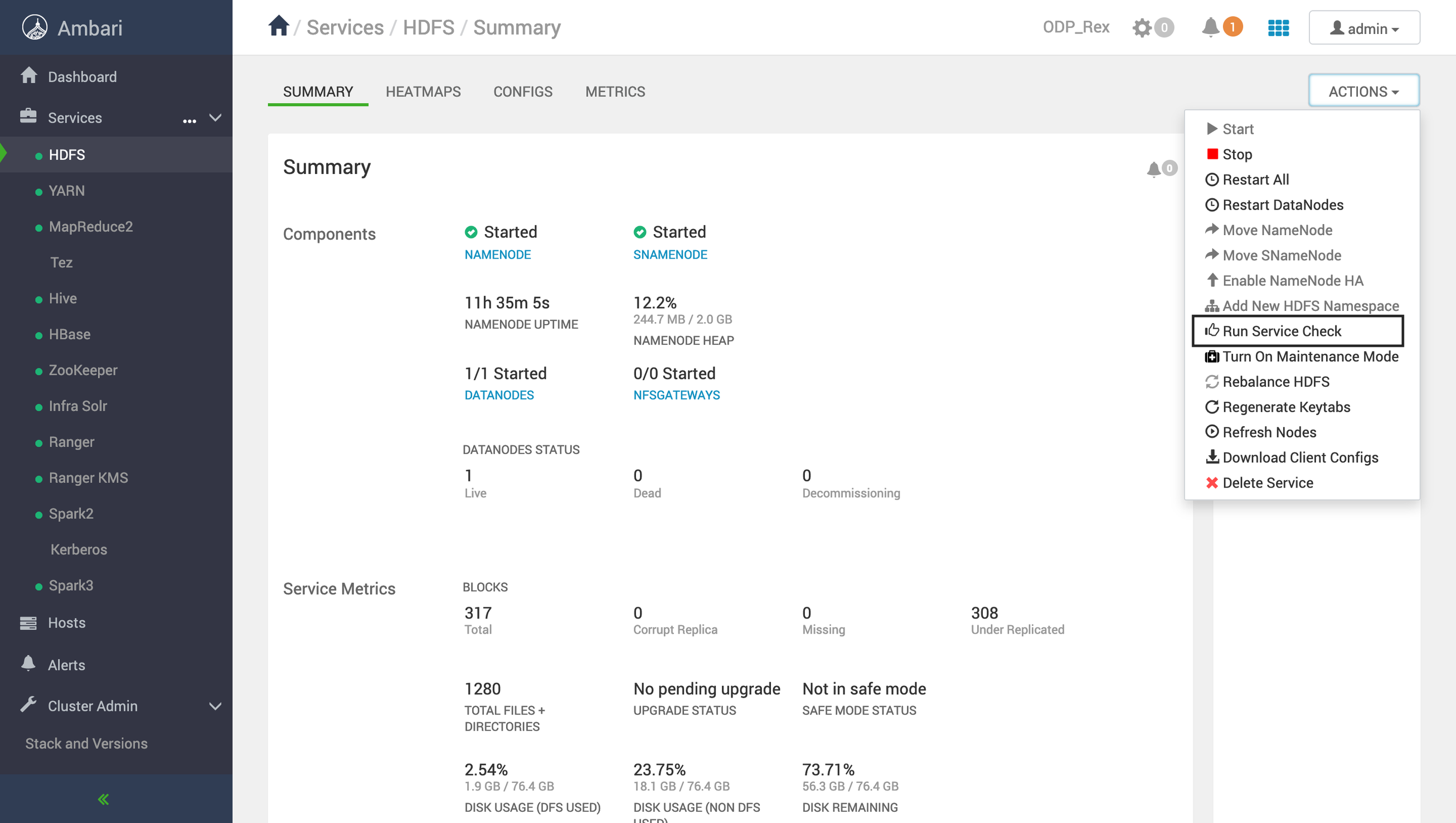
Service Checks
Ensure that you run service checks for all the installed stack services by performing the following steps in the UI:
- Navigate to Actions > Service Check.
For example, here's how to perform a service check for HDFS. Remember to perform this check for all the installed services in your stack.
Common Steps to Perform Before the Upgrade
- Ensure that you have successfully run service checks for all the services and uninstalled any existing mpacks before proceeding with the upgrade. If you face any service check issue kindly look at troubleshooting steps mentioned at the end of the document.
- (For reference before the upgrade, check Ambari warnings.) The following warning may appear if you have mpacks installed and linked to your stack (e.g., SPARK3). Ensure that they are properly addressed or removed before proceeding with the upgrade, and only proceed once you are certain that the warnings are unnecessary or will not impact the upgrade.
Sample Exception
The following components are reporting unexpected versions:
manish1.odp.ce
SPARK3_CLIENT: UNKNOWN
SPARK3_JOBHISTORYSERVER: UNKNOWN
NIFI_MASTER: UNKNOWN
manish2.odp.ce
SPARK3_CLIENT: UNKNOWN
manish3.odp.ce
SPARK3_THRIFTSERVER: UNKNOWN
SPARK3_CLIENT: UNKNOWN
LIVY3_SERVER: UNKNOWN
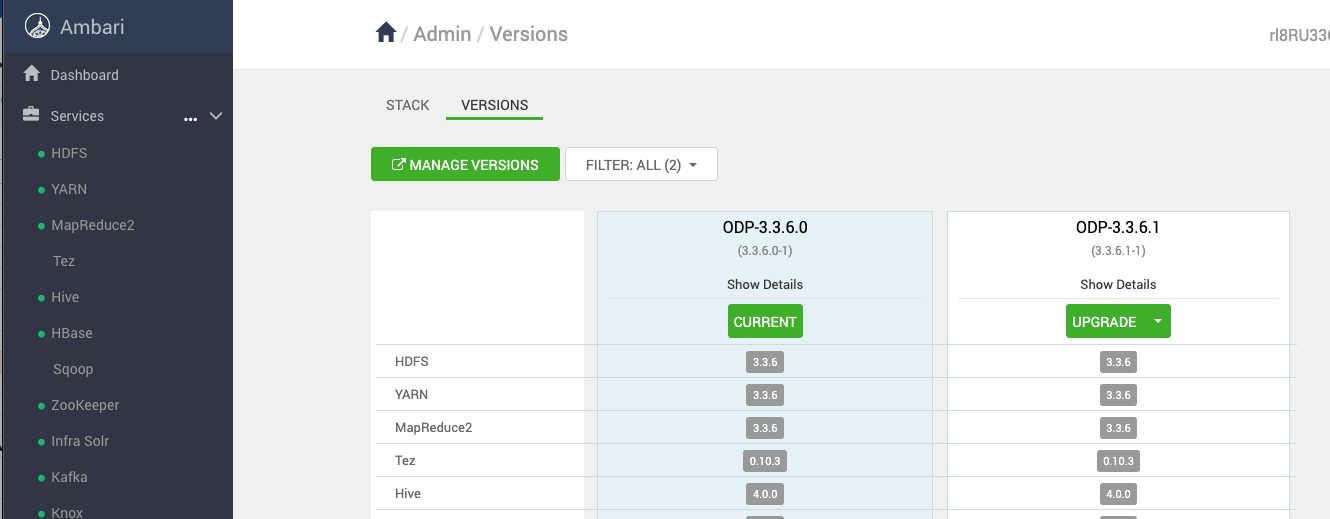
- Navigate to the Stack and Version page and click UPGRADE for the newly added stack.
Troubleshooting Steps for Service Checks
Follow these troubleshooting steps for the listed services below:
Zookeeper Service
Grant permission to zookeeper.log
chmod 664 /var/log/zookeeper/zookeeper.log
Kafka Service
Modify the file at location /usr/odp/3.3.6.1-1/kafka/bin/kafka-run-class.sh with content mentioned here.