ODP
Search documentation…
⌘K
Documentation
Support Matrix
Version
ODP
ODP 3.3.6.4-1
ODP 3.3.6.3-1
ODP 3.3.6.2-102
ODP 3.3.6.2-1
ODP 3.3.6.1-1
ODP 3.3.6.0-1
ODP 3.2.3.7-3
ODP 3.2.3.7-2
ODP 3.2.3.6-3
ODP 3.2.3.6-2
ODP 3.2.3.5-3
ODP 3.2.3.5-2
ODP 3.2.3.4-3
ODP 3.2.3.4-2
ODP 3.2.3.3-3
ODP 3.2.3.3-2
ODP 3.2.3.2-3
ODP 3.2.3.2-204
ODP 3.2.3.2-203
ODP 3.2.3.2-2
ODP 3.2.3.1-3
ODP 3.2.3.1-2
ODP 3.2.3.0-3
ODP 3.2.3.0-2
Esc
Release Notes
Acceldata ODP 3.3.6.1-1 Release Notes
Supported Apache Component Versions
New Features
Enhancements
Bug Fixes
Apache Release Notes
Known Limitations
What is ODP
Introduction to Open Source Data Platform (ODP)
Installation
Getting Started
Apache Ambari Installation and Cluster Setup
Pre-installation Preparation
Software and Memory Requirements
Maximum Open Files Configuration
Data Collection and Environment Preparation
Setting up the Environment
1 Configuring Password-less SSH
2 Enable NTP on Cluster and Browser Host
3 Edit the Host File and Set the Hostname
4 Edit the Network Configuration File
5 Configuring iptables
6 Disable SELinux, PackageKit, and check the umask Value
Using an Existing Database or Installing a Default One
Using a Local Repository
Deploying ODP In Production Data Centers With Firewalls
Accessing Acceldata Repositories
Ambari Repositories
ODP Stack Repositories
Utility Repositories
Installing Ambari
Installing the Ambari Server
Set up the Ambari Server
Installing the Ambari Agents Manually
Cluster Deployment and Configuration
Start the Ambari Server
Log in to Apache Ambari
Launch the Cluster Install Wizard
Cluster Naming and Version Selection
Configuring Ambari with RedHat Satellite or Spacewalk
Installation Options
Host Confirmation
Service Selection
Master, slave, and client node Assignment
Service Customization
Review Install, Start, or Test
Finalization and Completion
Guide for Management Packs
Adding a New Node to the ODP Cluster
Using Oracle Database with ODP
Using Ambari with Oracle
Using Hive with Oracle
Using Oozie with Oracle
Using Ranger and RangerKMS with Oracle
Using Hue with Oracle
Using Schema Registry with Oracle
Component User guide and Installation Instructions
Install Oozie
Airflow
Single Node Installation
MultiNode Installation
Advanced Configurations
Installing Custom Packages in Apache Airflow
Airflow Log Clean-up and DAG Management
Apache Airflow Logging Guide
Running Apache Airflow Commands via CLI
Druid
Enabling Kerberos in Druid
Enabling LDAP on Druid
Enabling SSL on Druid
Installing Flink and Usage
Installing Impala
Jupyterhub
Jupyter Prerequisites
Installing JupyterHub via Mpack
Handling HDFS and YARN Permissions
Configuring YarnSpawner and HDFSCM
Debugging Issues with YarnSpawner and HDFSCM
Enabling SSL for JupyterHub
Configuring Databases for JupyterHub
Jupyter Authentication
Documentation for Spark Notebook Examples
Error in Submitting YARN Job
Custom Packages Installation in JupyterHub Notebook
Kafka
Kafka Connect
Kafka MirrorMaker 2
Cruise Control
Installing Kafka 3
Kafka Connect 3
Kafka MirrorMaker 3
Kafka Cruise Control 3
Zookeeper to Kraft Migration
Deployment of Standalone Kafka
Installing Knox
Configure Okta SSO for Apache Knox
Kudu
Modern Open Table Format integration with ODP
Hudi
Iceberg
Delta Lake
Integrate Delta Lake with Hive 4.0.0
Deploy the Delta-Hive Connector
Installing NiFi
Ozone
Ozone Configurations
Ozone Installation
Ozone Command Line Interface
Working with Ozone File System
Using Ozone S3 Gateway
Pinot
Introduction to Apache Pinot
Apache Pinot Sizing Guide
Install Pinot via Mpack
Install Knox
Batch Import using Local File
Streaming Ingestion Example with Kafka 2/Kafka 3
Configure Schema and Tables in a Kerberized Environment
Apache Pinot Batch Import using HDFS
Operational Workflow of Pinot
Leverage HDFS as Deep Storage for Real-Time Tables
Pinot Known Limitations
Schema Registry
Trino
Introduction to Trino
Trino Capacity Planning
Install Trino via Mpack
Set up Trino SSL
Set up Trino Knox
Set up Trino Ranger (For 3.3.6.1-x or later)
Trino Supported Connectors
Configure JMX
Troubleshooting Trino
Configure Trino Client
Trino Known Limitations
Upgrade Instructions
Upgrade Path to ODP 3.3.6.1-1
Master Upgrade from 3.3.6.0-x to 3.3.6.1-1
Upgrade Prerequisites
Ambari Upgrade
Upgrade Ambari Server
Upgrade Ambari Agents
Upgrade Infra-solr
ODP Stack Upgrade
ODP Rolling upgrade
ODP Express Upgrade
Master Upgrade from 3.2.x.x to 3.3.x.x
Pre-requisites for Upgrade
Pre-requisites for Configuration Backup
ODP Stack Upgrade
ODP Upgrade Halt State
ODP Rolling Upgrade
Ambari Server Upgrade
Ambari Agents Upgrade
Infra Solr Upgrade
Start the ODP Stack Services
Resume and Finalize the ODP Stack Upgrade
Sanity Check: Post Upgrade
Troubleshooting
FAQs About Upgrade
Upgrade Standalone Kafka
ODP Reference Guide
Ambari Admin Guide
Using the Administrator Role in Ambari Web
Setting up Ambari to use an Internet proxy server
Managing Cluster Roles
Managing Versions
Managing Local Users
Ambari High Availability Setup
Administration
Administering HDFS
Managing and Monitoring a Cluster
Managing High Availability
Configuring Dynamic Management for HDFS NameNode and DataNode
Enhance Replication and Decommissioning process
Setting Hadoop Service Log Levels at Runtime
Storage
Configuring ADLS Gen2 with ODP
Configuring ODP with GCS
Configuring ODP with AWS S3 using S3A
Configuring Ports
Controlling ODP Services Manually
HDFS Router Federation
Set up the ODBC and JDBC Connections
Set up the Hive and Impala ODBC Connection
Set up the Hive and Impala JDBC Connection
Securing Hive with KNOX
Set up HAProxy Load Balancer for HiveServer2
Service Tuning
HDFS: Separate RPC Queues and Enable Lifeline Protocol
Erasure Coding for Data Durability
Understanding Erasure Coding Policies
Comparing Replication and Erasure Coding
Best Practices for Rack and Node Setup for EC
Prerequisites for Enabling Erasure Coding
Limitations of Erasure Coding
Using Erasure Coding for Existing Data
Using Erasure Coding for New Data
Advanced Erasure Coding Configuration
Erasure Coding CLI Commands
Erasure Coding Examples
Guidelines for Enabling Ranger Auditing on Supported Plugins
Enabling Ranger HDFS Audits
Enabling Ranger Solr Audits
Migrating Oozie Workflows to Airflow DAGs (O2A)
How to Convert Oozie Workflows to Airflow DAGs
Bulk Workflow Migration
Shell Example
Hive/Hive2 Example
Known Limitations (O2A)
Errors You May Encounter
Unsupported Features (O2A)
ODP Troubleshooting Guide
Troubleshooting ODP
Ambari Troubleshooting
HDFS NameNode Heap Estimation
Troubleshooting premature swapping
Troubleshooting the Kerberos Configuration Issues in Ambari
Troubleshooting JVM: JStack, Heap Dumps and JFR
Troubleshooting ODP SSL, Keystore, and Truststore
What is SSL?
Key Concepts: Keystore and Truststore
Types of Certificates
How to Check the Certificate Type?
JKS Creation and Management
Extracting Certificates and Keys
Checking Subject Alternative Name (SAN) and Extensions
Creating a Keystore in PKCS12 Format
TLS Verification
Checking SSL Ciphers
Additional SSL Troubleshooting Commands
Troubleshooting Ambari SSL and LDAPS Setup
Services SSL and Truststore Configuration
Configure the Ranger Plugin Truststore SSL
SSL Troubleshooting for Hadoop Clusters
SSL/TLS Security Best Practices for Hadoop Clusters
Security
Authentication
Replacing Knox Self-Signed Certificate with CA Certificate
Enabling SSL for Services Using Bash Script
Enabling Kerberos in an ODP Cluster
Bash Scripts for Automated Tasks
Securing NiFi with Existing CA Certificates
Configuring SSL for the Ambari Server
Accessing a Kerberized UI Firefox
Configure Ranger Admin and Usersync with SSSD or Centrify
Enabling Cross-Cluster and Cross-Realm Kerberos Authentication for Hadoop Data Migration
Authorization
Providing Authorization with Apache Ranger
Configuring Ambari Authentication for LDAP/AD
Securing HiveServer2 with LDAP Authentication
Configuring Ranger Admin High Availability (HA)
Encryption
Enabling the ODP Ranger KMS High Availability (HA) and Troubleshooting
Disabling High Availability (HA) in ODP Ranger KMS
Copying the Encrypted Data Between Two ODP Clusters Using Ranger KMS
Uninstall ODP
Complete Uninstallation of ODP
ODP
›
Installation
›
Launch the Cluster Install Wizard
Launch the Cluster Install Wizard
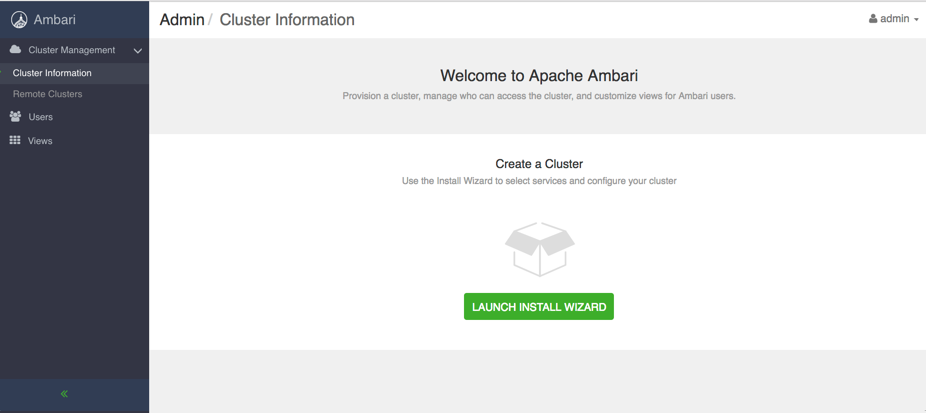
From the Ambari Welcome page, choose
Launch Install Wizard
.
Was this page helpful?
0 helpful · 0 not helpful
Yes
No
Send feedback