
Public APIs for Pulse
This documentation contains instructions for using public APIs of Pulse.
- Obtain JWT Token:
- Open your terminal or command prompt.
- Use the following curl command to obtain the JWT token and role:
curl -i 'http://<pulse url>/login' \
-H 'accept: application/json, text/plain, */*' \
-H 'content-type: application/json' \
--data-raw '{"email":"<username>","password":"<base64 encoded password>"}'
Replace <pulse url>, <username>, and <base64 encoded password> with your specific values. The password should be base64 encoded.
- Example:
curl -i 'http://example.com/login' \
-H 'accept: application/json, text/plain, */*' \
-H 'content-type: application/json' \
--data-raw '{"email":"john.doe@example.com","password":"<password_placeholder>"}'
- Capture JWT Token and Role:
- After running the curl command, you should receive an output similar to this:
HTTP/2 200
date: Thu, 13 Jun 2024 05:17:07 GMT
content-type: application/json; charset=utf-8
content-length: 63
server: nginx
access-control-allow-origin: *
x-frame-options: DENY
x-content-type-options: nosniff
set-cookie: jwt=<jwt_token>; Max-Age=900; Path=/; Expires=Thu, 13 Jun 2024 05:32:07 GMT
etag: W/"3f-Y6s9mpm2ANCRhWr9ueS4XY2nCP8"
{"message":"Authentication successful!","data":{"role":"e30="}}
- From this output, copy the jwt value and note down the role.
- Set Up Cookie Modifier Plugin:
- Install a cookie modifier plugin in your browser (e.g., EditThisCookie for Chrome, Cookie Manager+ for Firefox).
- Add the following three cookies:
- jwt: Paste the JWT token obtained from the curl command.
- Other cookies specific to your API's requirements, if any.
- Access GraphQL Playground:
- Open your web browser.
- Enter the following URL in the address bar:
http://<pulse url>/graphql
Replace <pulse url> with your actual API URL.
- Verify Access:
- If the cookies are valid and correctly set up, the GraphQL Playground should open up in your browser.
- You should now be able to interact with the API using GraphQL queries.
Info
- Ensure that your JWT token is kept secure and not exposed unnecessarily.
- Update cookies as required if token expiration or session management policies change.
- Use a browser-based plugin, such as ModHeader or JWT Inspector to add an additional Json Web Token (jwt) header to the URL.
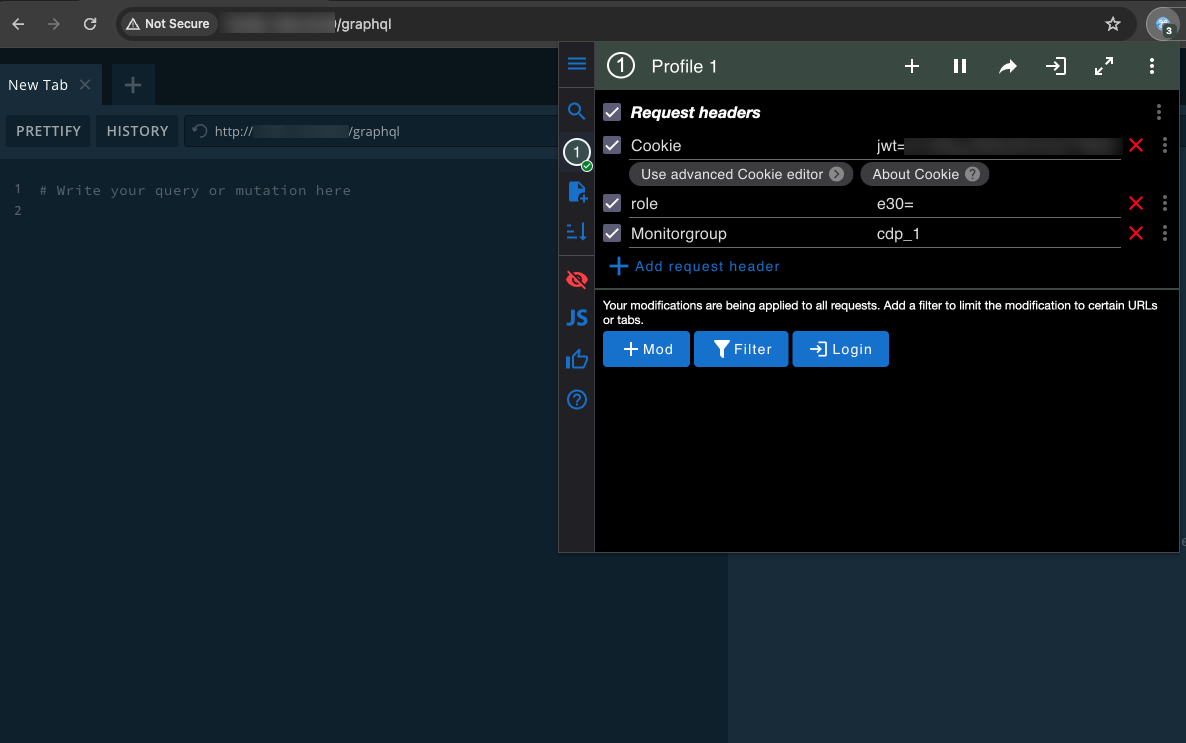
- The page must be refreshed after the header is added. On refreshing the page, the Documentation Explorer panel appears on the right side.

- Click on the Query hyperlink to view all the queries of the Pulse dashboard.
- Enter the name of the query in the Search Schema search bar to search for a specific query.
This allows you to access APIs for Pulse. For more information on accessing public APIs, contact support@acceldata.io.
Rest API
REST API’s allow the user to get status on the running application. The following are the Rest API:
- API to Create Roles
- API to Create Bulk Users
- API to Fetch Version Details
API to Create Roles
The following describes the method to input Roles to the user interface (UI).
- Select any API testing tool to invoke an API.
- Include the additional JSON Web Token (jwt) header for authentication in the request, which is obtained in the during logging in to the API testing tool.
- Include the following argument:
Method -
{
"localUsers" : [ ], - optional
"adGroupsMapped" : [ ], - optional
"adUsersMapped" : [ ], - optional
"clusters" : [ <list of cluster names>], - required
"name" : “<role name>", - required
"serviceQueues" : { - required
“<cluster name 1>" : [<list of yarn queues>],
“<cluster name 2>" : [<list of yarn queues>],
.
.
},
"serviceUsers" : { - required
“<cluster name 1>" : [<list yarn users>],
“<cluster name 2>" : [<list yarn users>],
.
.
},
"impalaUsers" : { - required if impala
“<cluster name 1>" : [<list of impala users>],
“<cluster name 2>" : [<list of impala users>]
.
.
},
"permissions" : { - required
“<component name>”: true/false,
.
.
}
}
The following are the list of available components for permissions:
"dashboard" : true,
"studio" : true,
"dashplots" : true,
"hdfs" : true,
"yarn" : true,
"spark-thrift" : true,
"mr" : true,
"tez" : true,
"llap" : true,
"hiveOnSpark" : true,
"spark" : true,
"hbase" : true,
"kafka" : true,
"ni fi" : true,
"druid" : true,
"impala" : true,
"memsql" : true,
"chargeback-reports" : true,
"applications-explorer" : true,
"databases" : true,
"nodes" : true,
"logs" : true,
"alerts" : true,
"actions" : true,
"hdfs~fsanalytics" : true,
"hdfs~ fileExplorer" : true,
"yarn~services" : true,
"spark-thrift~queries" : true,
"spark-thrift~tables" : true,
"spark-thrift~reports" : true,
"mr~mr-queries" : true,
"mr~mr-tables" : true,
"tez~tez-queries" : true,
"tez~tez-tables" : true,
"llap~llap-daemons" : true,
"llap~llap-queries" : true,
"llap~llap-tables" : true,
"llap~llap-reports" : true,
"hiveOnSpark~hiveOnSparkQueries" : true,
"hiveOnSpark~hiveOnSparkTables" : true,
"spark~spark-jobs" : true,
"spark~spark-streams" : true,
"hbase~regions" : true,
"hbase~tables" : true,
"hbase~snapshot" : true,
"hbase~proctor" : true,
"hbase~services" : true,
"kafka~topics" : true,
"kafka~brokers" : true,
"kafka~consumers" : true,
"ni fi~process-groups" : true,
"ni fi~flow-files" : true,
"druid~services" : true,
"druid~queries-dashboard" : true,
"impala~impala-queries" : true,
"impala~impala-tables" : true,
"impala~impala-daemons" : true,
"memsql~queries" : true,
"memsql~user-queries" : true,
"memsql~plan" : true,
"memsql~tables" : true,
"memsql~pipelines" : true,
"chargeback-reports~nodelabels" : true,
"databases~hivefsanalytics" : true,
"alerts~incidents" : true,
"actions~executions" : true,
"spark-thrift~kpi~view" : true,
"spark-thrift~kpi~createEdit" : true,
"mr~kpi~view" : true,
"mr~kpi~createEdit" : true,
"tez~kpi~view" : true,
"tez~kpi~createEdit" : true,
"hiveOnSpark~kpi~view" : true,
"hiveOnSpark~kpi~createEdit" : true,
"spark~kpi~view" : true,
"spark~kpi~createEdit" : true,
"druid~queries-dashboard~queries" : true,
"memsql~pipelineruns" : true,
"memsql~pipeline files" : true,
"alerts~kpi~view" : true,
API to Create Bulk Users
The following describes the method to input bulk Users to the UI.
- Select any API testing tool to invoke an API.
- Include the additional JSON Web Token (jwt) header for authentication in the request, which is obtained in the during logging in to the API testing tool.
- Include the following argument:
Method -
{
"username": "<username>", - required
"email": "<email>", - optional
"password": "<password>", - required if not ldap user
"role": “<role name>", - required
"ldapUser": true/false, - required
"catalogRole": “<catalog role>", - optional
}
An array of User objects can be sent as payload to the above API to insert multiple users at once.
API to Fetch Version Details
You can use the following API details and steps to fetch the Pulse version.
- Select any API testing tool to invoke an API.
- Include the additional JSON Web Token (jwt) header for authentication in the request, which is obtained during logging into the API testing tool.
- Include the following argument:
Method -
Endpoint URL: /get-pulse-version
GraphQL Query:
query getPulseVersion {
getPulseVersion {
imageTag
version
}
}
Response:
{
"Image tag" : "3.x.x-xxxxxx"
"Version" : "3.x.x"
}