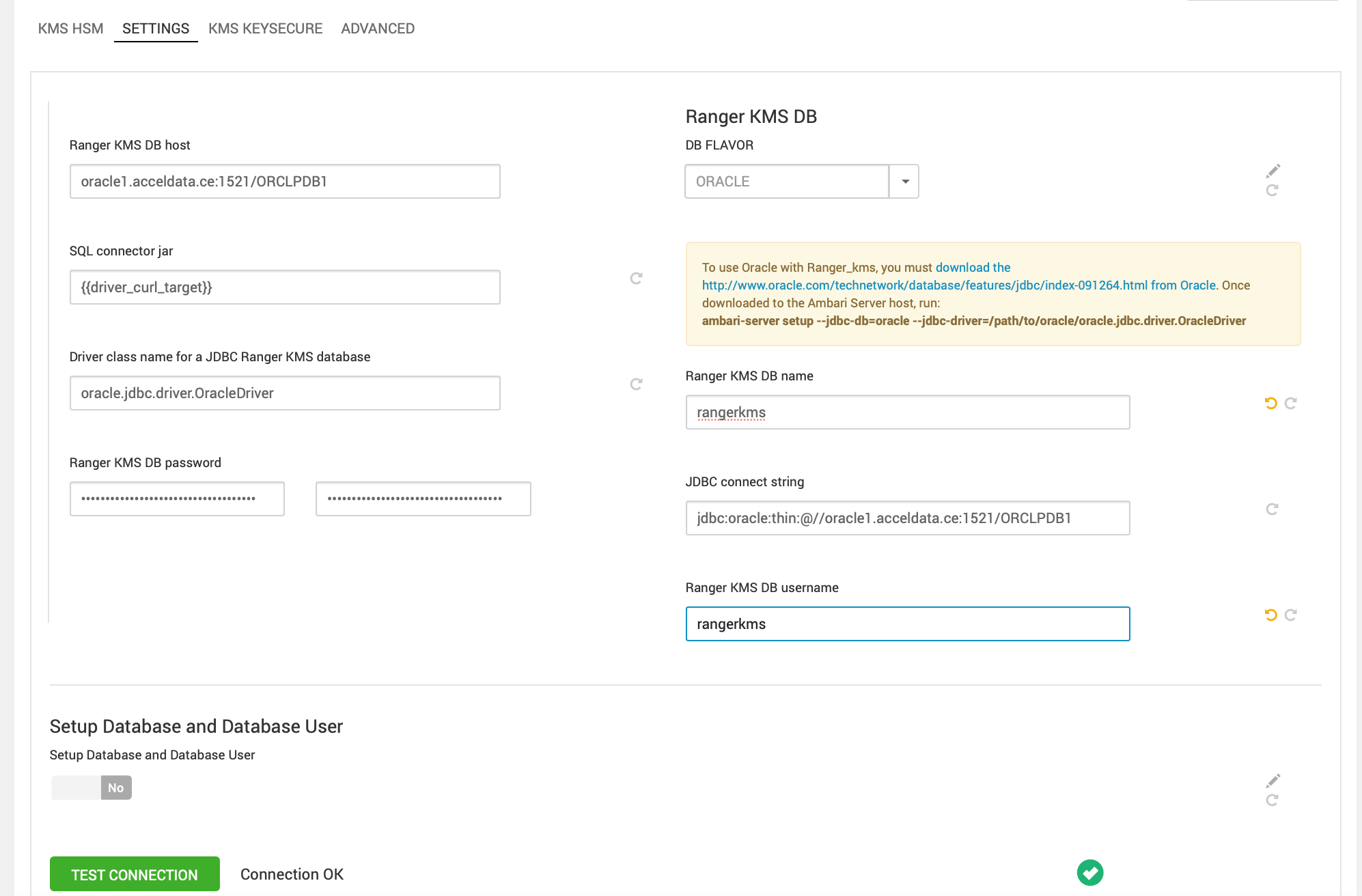
Using Ranger and RangerKMS with Oracle
Before setting up Ranger and RangerKMS with an existing Oracle database, obtain the appropriate drivers and .jar files, create a Ranger/RangerKMS user with sufficient permissions, and load the Ranger/RangerKMS database schema.
Determine the appropriate Oracle database version and obtain the release drivers and .jar file.
Oracle Database Version | Drivers | File |
|---|---|---|
Oracle Database 19c | Oracle Database 19c drivers | ojdbc11.jar |
Steps for Ranger
- Install the appropriate JDBC .jar file on the Oracle host.
- Download the Oracle JDBC (OJDBC) driver from the JDBC and UCP Downloads page.
- For Oracle Database 19C, select the Oracle Database 23ai (23.8.0.25.04) JDBC Driver > ojdbc11.jar.
- Copy the .jar file to the Java share directory.
cp ojdbc11.jar /usr/share/java/
Make sure the .jar file has the appropriate permissions. For example:
chmod 644 /usr/share/java/ojdbc11.jar
- Create the Ranger databases using the Oracle database administrator. You can use the following series of commands to create a Ranger user and grant permissions using SQL*Plus.
Info
ORCLPDB1 refers to the Pluggable Database (PDB) within the multi-tenant Oracle Container Database (CDB) named ORCLCDB, introduced in Oracle 12c. Any operations, such as creating or dropping tablespaces, within this context, apply specifically to the ORCLPDB1 PDB.
# sqlplus sys/root as sysdba
sqlplus / as sysdba
SQL*Plus: Release 19.0.0.0.0 - Production on Fri May 9 04:27:05 2025
Version 19.3.0.0.0
Copyright (c) 1982, 2019, Oracle. All rights reserved.
Connected to:
Oracle Database 19c Enterprise Edition Release 19.0.0.0.0 - Production
Version 19.3.0.0.0
SQL> alter session set container=ORCLPDB1;
Session altered.
SQL> CREATE TABLESPACE rangerdba DATAFILE '/opt/oracle/oradata/ORCLCDB/ORCLPDB1/rangerdba.dbf' SIZE 100M AUTOEXTEND ON NEXT 10M MAXSIZE UNLIMITED;
2 3 4 5 6
Tablespace created.
SQL> CREATE USER rangerdba IDENTIFIED BY rangerdba DEFAULT TABLESPACE rangerdba TEMPORARY TABLESPACE TEMP QUOTA UNLIMITED ON rangerdba;
User created.
SQL> GRANT CONNECT, RESOURCE TO rangerdba;
Grant succeeded.
SQL> GRANT CREATE SESSION, CREATE TABLE, CREATE SEQUENCE TO rangerdba;
2 3 4 5
Grant succeeded.
SQL>GRANT CREATE VIEW TO rangerdba;
Grant succeeded.
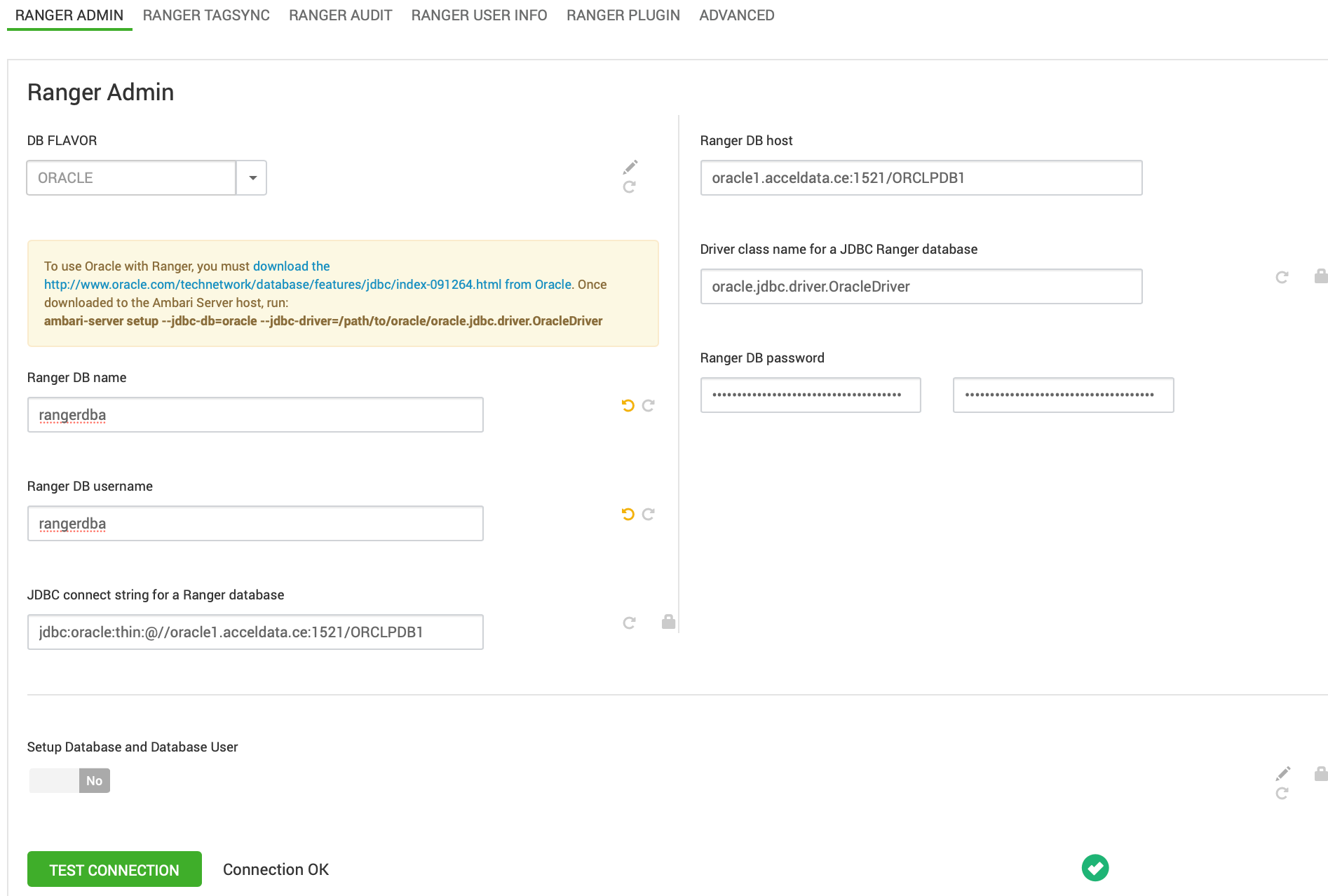
- Set the jdbc/driver/path based on the location of the Oracle JDBC driver .jar file. This command must be run on the server where Ambari server is installed: ambari-server setup --jdbc-db={database-type} --jdbc-driver={/jdbc/driver/path}.
- Start the Ranger installation.
Steps for RangerKMS
Create the RangerKMS databases using the Oracle database administrator. You can use the following series of commands to create a RangerKMS user and grant permissions using SQL*Plus.
Info
ORCLPDB1 refers to the Pluggable Database (PDB) within the multi-tenant Oracle Container Database (CDB) named ORCLCDB, introduced in Oracle 12c. Any operations, such as creating or dropping tablespaces, within this context, apply specifically to the ORCLPDB1 PDB.
# sqlplus sys/root as sysdba
sqlplus / as sysdba
SQL*Plus: Release 19.0.0.0.0 - Production on Fri May 9 04:27:05 2025
Version 19.3.0.0.0
Copyright (c) 1982, 2019, Oracle. All rights reserved.
Connected to:
Oracle Database 19c Enterprise Edition Release 19.0.0.0.0 - Production
Version 19.3.0.0.0
SQL> alter session set container=ORCLPDB1;
Session altered.
SQL> CREATE TABLESPACE rangerkms DATAFILE '/opt/oracle/oradata/ORCLCDB/ORCLPDB1/rangerkms.dbf' SIZE 100M AUTOEXTEND ON NEXT 10M MAXSIZE UNLIMITED;
2 3 4 5 6
Tablespace created.
SQL> CREATE USER rangerkms IDENTIFIED BY rangerkms DEFAULT TABLESPACE rangerkms TEMPORARY TABLESPACE TEMP QUOTA UNLIMITED ON rangerkms;
User created.
SQL> GRANT CONNECT, RESOURCE TO rangerkms;
Grant succeeded.
SQL> GRANT CREATE SESSION, CREATE TABLE, CREATE SEQUENCE TO rangerkms;
2 3 4 5
Grant succeeded.
SQL>GRANT CREATE VIEW TO rangerkms;
Grant succeeded.