Set up Trino SSL
SSL Requirement
- If any authentication (Kerberos, LDAP) is enabled for Trino, SSL must also be enabled.
- In Ambari, when Kerberos is enabled, the 'Enable SSL' option is automatically selected. Disabling SSL while using authentication will cause Trino services to fail at startup.
- The SSL certificate must have a valid SubjectAlternativeName (SAN). The SSL certificates without a SAN are not supported.
SSL Setup
- Must use either a passwordless .pem file or a .jks keystore with a password on all the trino nodes, readable by Trino user.
- Configure SSL Keystore Path=<path to pem/keystore location>, this path must be the same for each trino server as shown below.

- A Shared Key must be configured when SSL is enabled. You can generate it using below command.
openssl rand 64 | base64
Enter the generated key in the 'Shared Key' configuration field during Trino setup under Advanced trino-env.
Internal Node-to-Node SSL (Optional)
The internode SSL communication between the Coordinator and Worker nodes, can be enabled as per below steps, however there is a performance degradation and it is not recommended.
Requirement: All certificates must be imported into the JDK 23 cacerts truststore on each node.
The example command is as follows.
sudo keytool -importcert \
-trustcacerts \
-keystore /tmp/jdk-23/lib/security/cacerts \
-storepass changeit \
-alias trino-worker \
-file /etc/trino/worker.crt \
-noprompt
Kerberos Configuration
The kerberos properties are all auto configured in the Coordinator node’s config.properties.
The following properties are added in config.properties once security is identified as Kerberos.
http-server.authentication.type=KERBEROS
web-ui.authentication.type=KERBEROS
#http-server.authentication.krb5.service-name={{kerberos_service_name}}
## This line if you plan to use it through a HTTP connection and UI access via Knox
http-server.authentication.krb5.service-name=HTTP
http-server.authentication.krb5.principal-hostname={{hostname}}
http-server.authentication.krb5.keytab={{keytab}}
http.authentication.krb5.config=/etc/krb5.conf
LDAP Configuration
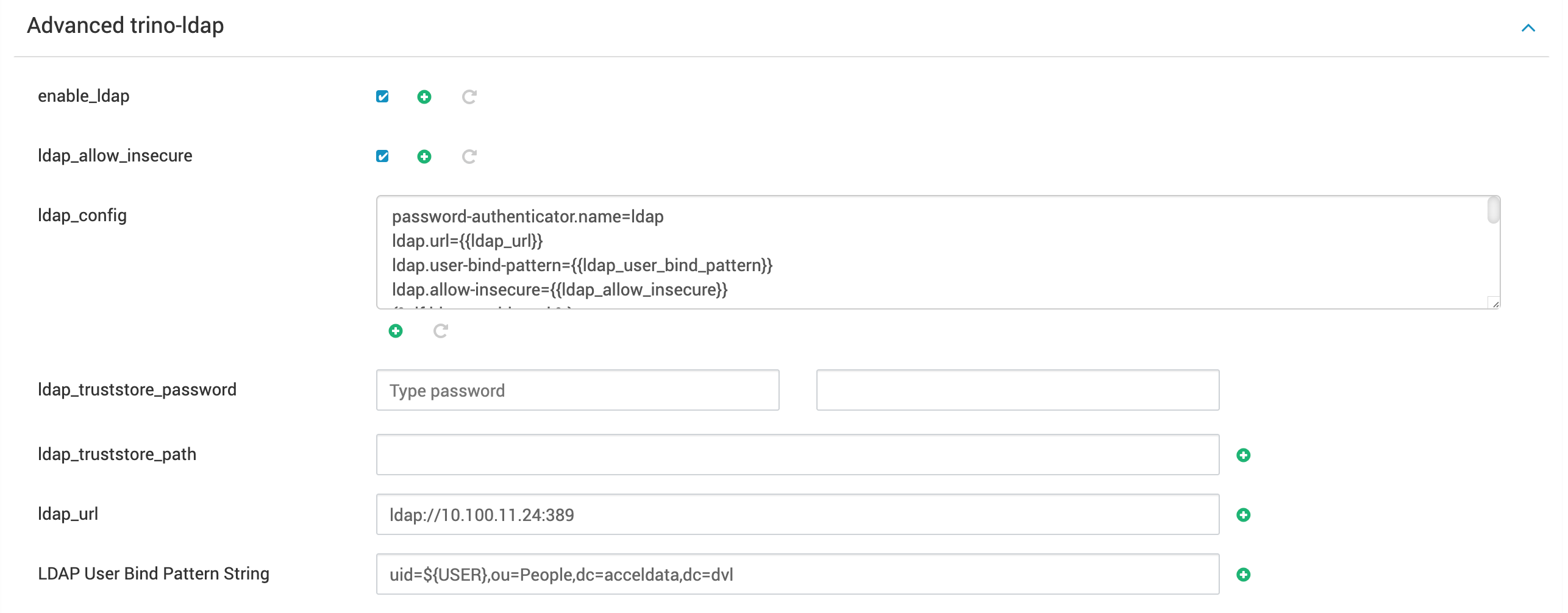
To configure or enable LDAP, the following two properties need to be configured under Advanced trino-ldap:
- LDAP URL
- LDAP User Bind Pattern String