
Configure Pulse to Connect to Kafka With SCRAM and SSL
This page describes how to configure Pulse to securely access and collect metrics from a Kafka cluster that uses SCRAM authentication and SSL encryption.
Info
Pulse supports Kafka clusters secured with SCRAM and SSL only in ODP-managed or standalone deployments.
Configure Pulse for Kafka on the ODP cluster
To allow Pulse to securely connect to Kafka that uses Scram and SSL on an ODP cluster, follow these steps:
- Run the cluster configuration command: accelo config cluster.
- If Kafka is using SCRAM authentication, you will be prompted with the following question. Select Y and provide the full path to your SCRAM config file.
Note Copy the kafka_jass.conf file to the Pulse node and provide its location when prompted during Pulse installation.
Is SCRAM authentication enabled for Kafka [y_n]:Y
Enter full path to the SCRAM config file (eg: _root_kafkaScramJAASLogin.conf): _home_acceldata_kafka_jass.conf
- If Kafka is using TLS/SSL, you will be prompted with the following question. Select Y and provide the full path to your certificates.
Note Copy the cacerts and jssecacert certificates to the Pulse node and provide its location when prompted during Pulse installation.
Is HTTPS Enabled in the Cluster on UI Endpoint? [Y_N]: : y
Enter the Java Keystore cacerts File Path:path_to_cacerts
Enter the Java Keystore jsseCaCerts File Path:_path_to_jssecacert
Info
These prompts appear in the Accelo CLI only when Kafka in the ODP cluster is configured for SCRAM-based authentication and using TLS/SSL. Specifically, the saslenabledmechanism parameter must be set to either SCRAM-SHA-256 or SCRAM-SHA-512.> > To verify or configure this setting in ODP (Ambari):> > 1. Open the Ambari UI.> 2. Navigate to Kafka > Configs > Advanced Kafka-broker.> 3. Locate the parameter saslenabledmechanism.> 4. Ensure the value is set to either SCRAM-SHA-256 or SCRAM-SHA-512.
Configure Pulse for Standalone Kafka Cluster
Info
SSL Configuration
When SSL is enabled for Kafka clusters, certificate handling in Acceldata Pulse involves two different consumers, and they must be configured correctly.
- Certificates for Accelo Binary
- Location: $ACCELDATA_HOME/config/security/cacerts
- Requirements:
Certificates must be in PEM format - Place all required CA / broker certificates here
- Purpose:
Used by the Accelo binary to establish secure connections with Kafka brokers
- Certificates for Kafka Connector
Format:
- Truststore (JKS/PKCS12)
- Keystore (JKS/PKCS12)
Requirements:
Store truststore and keystore separately
- Use distinct filenames (avoid overwriting/conflicts)
Purpose:
Used by the Kafka connector for SSL authentication and communication
To allow Pulse to securely connect to Kafka that uses Scram and SSL on a standalone cluster, follow these steps:
- Run the cluster configuration command: accelo config cluster.
- In the Deployment type, select Stand-Alone.
- Select Kafka3 Standalone component.
- Enter Cluster Name.
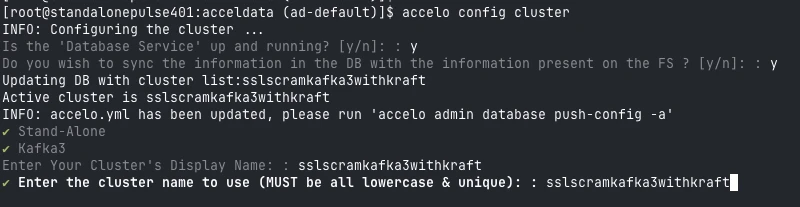
- Enter Kafka Version.
- Enter Kafka bootstrap server’s URI.
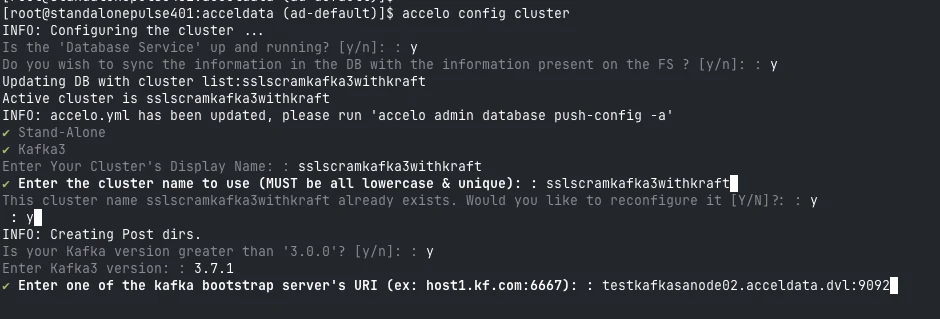
- Select scram as the security type.
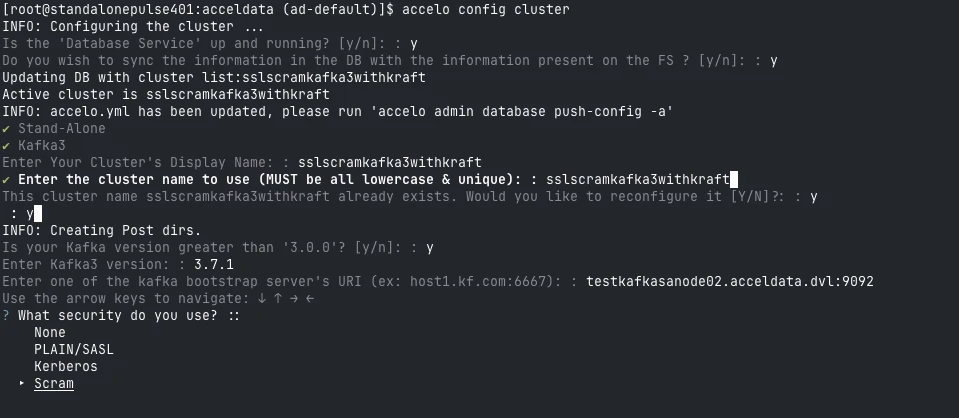
- Select Yes as TLS is being used.
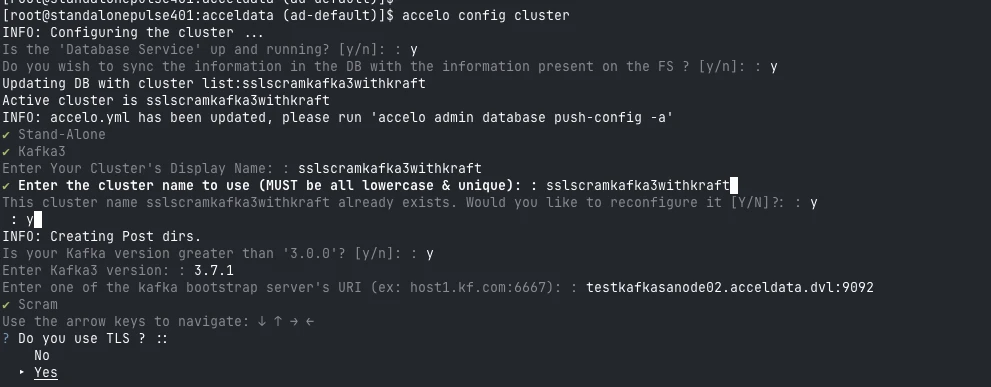
- Enter the Scram_jaas.conf file path.
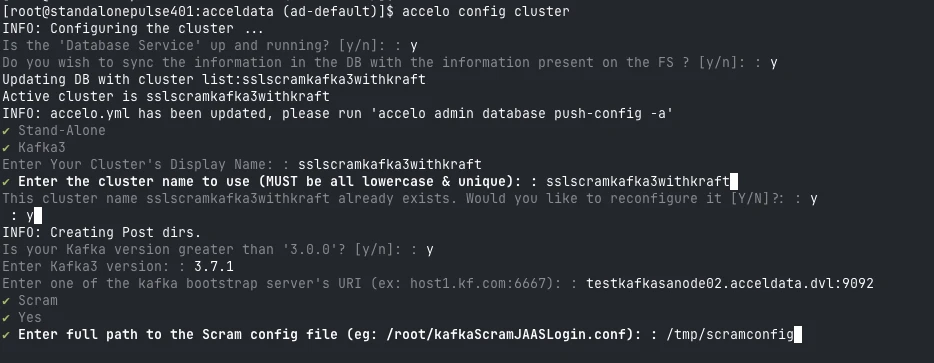
- Select the inter-broker scram protocol .
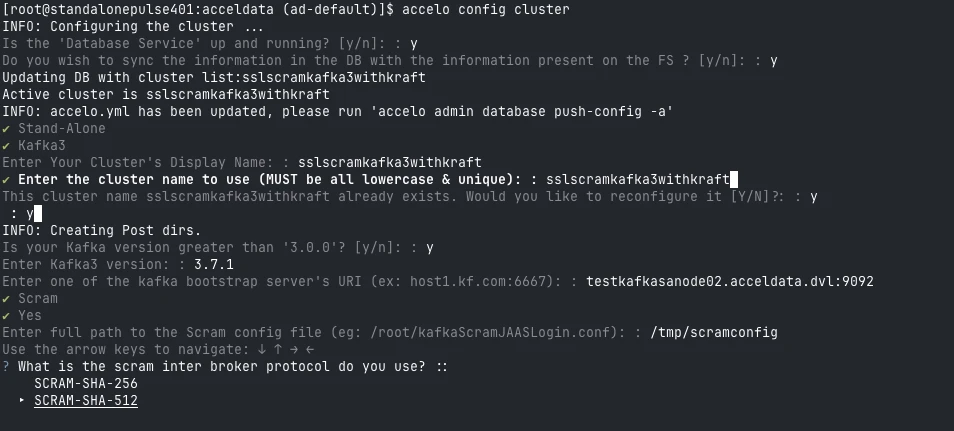
- Enter TLS certificate file path.
Info
Copy the cacerts and jssecacert certificates to the Pulse node and provide its location when prompted during Pulse installation.
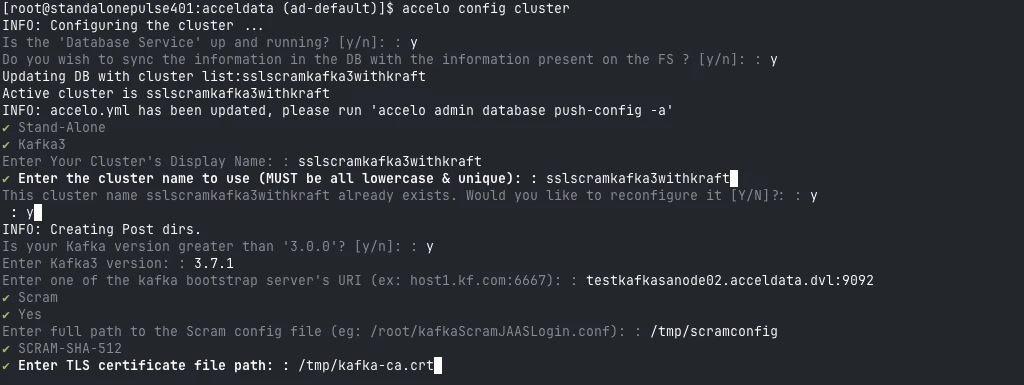
- Enter TLS key file path.
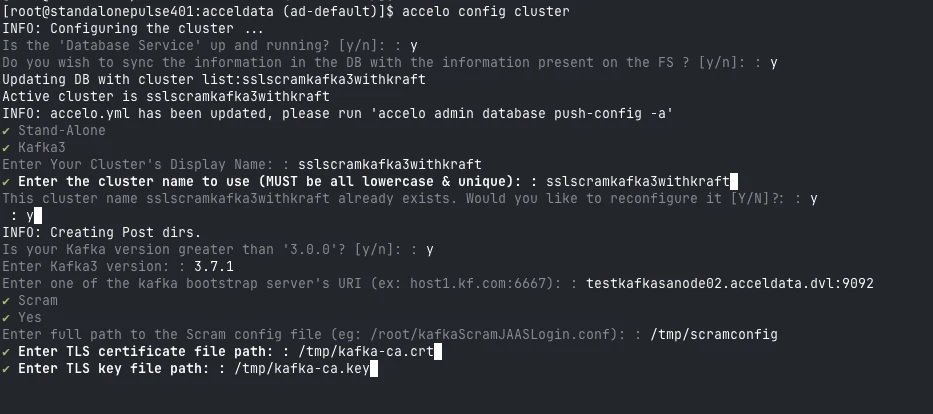
- Enter TLS CA file path.
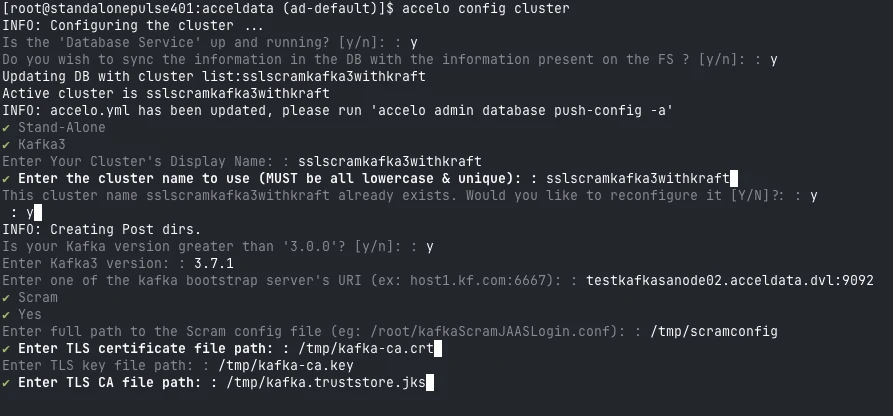
- Select Y for certification verification.
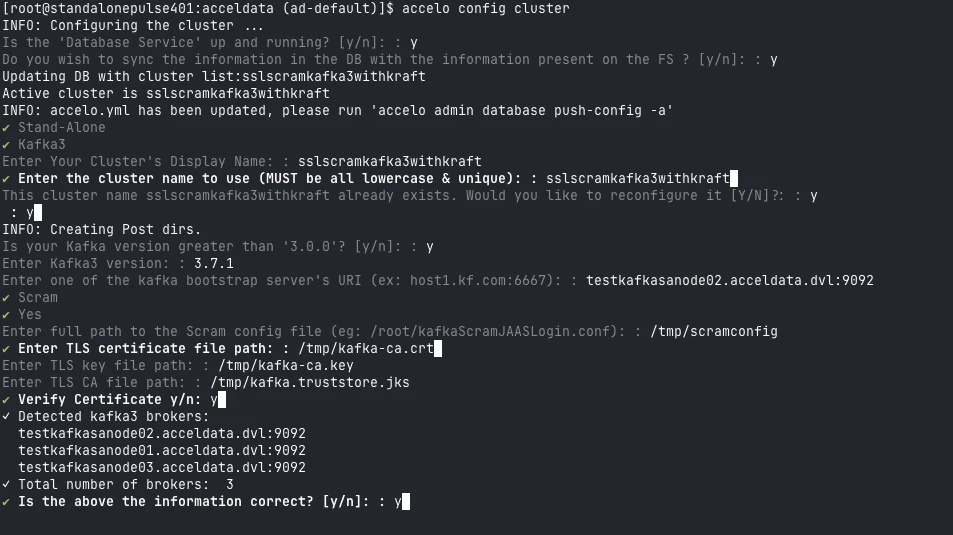
- If the above configs are correct CLI will automatically fetch the list of brokers. If the listing is correct select y .
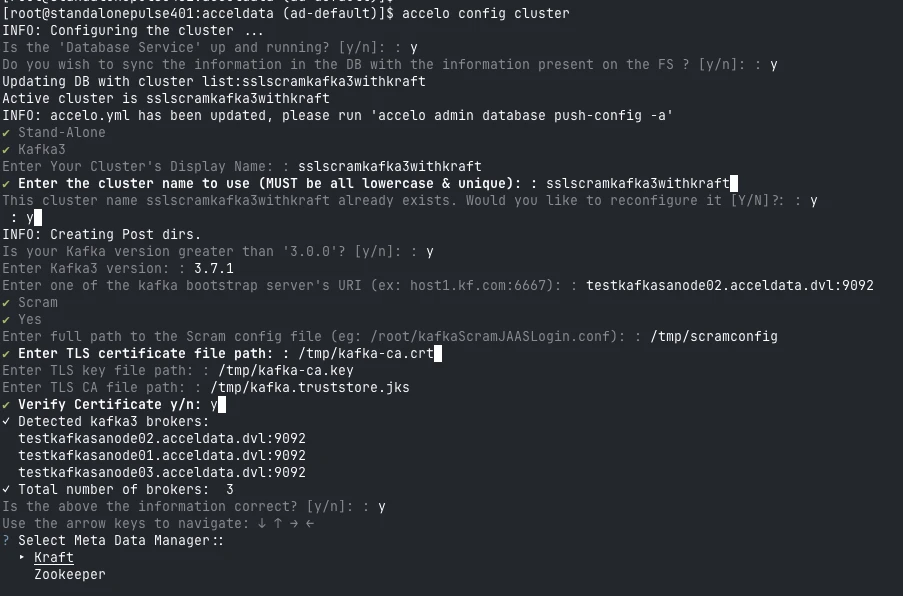
- Enter the Controller details( zookeeper/kraft )
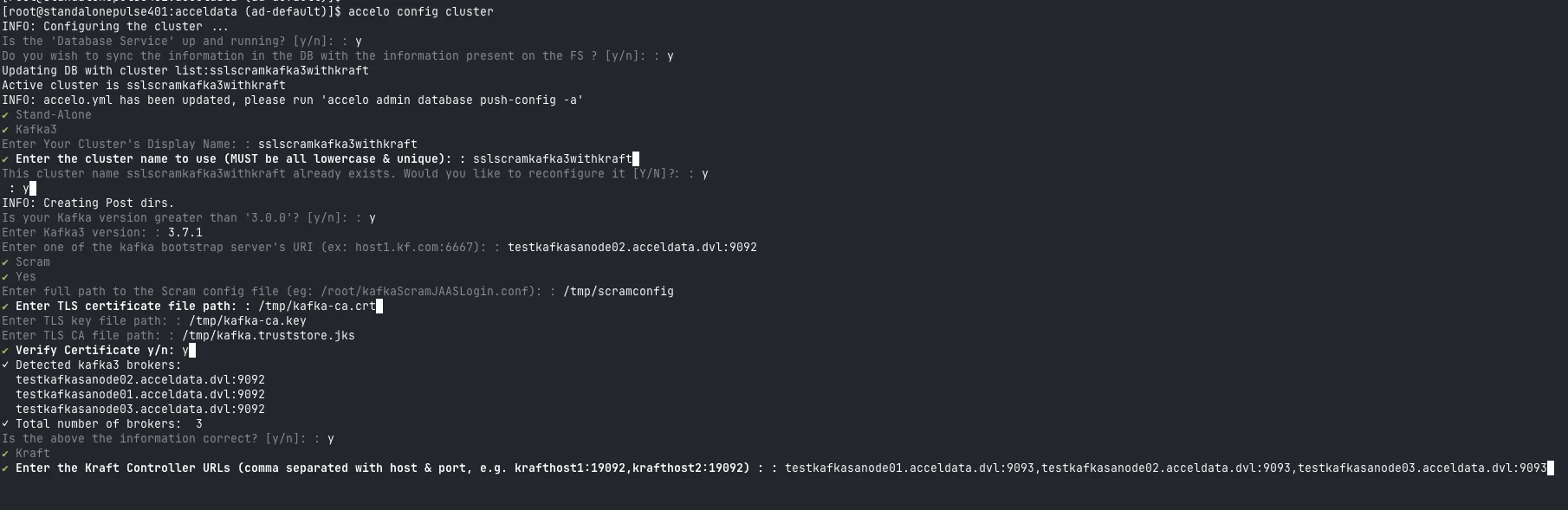
- Once the above configuration we can proceed with accelo deploy core
Update Kafka Connector Configuration
- Edit the file: $AcceloHome/config/docker/addons/ad-kafka-connector.yml.
- Set the following parameters.
SCRAM_ENABLED = true
KERBEROS_ENABLED = false
Push the Configuration
Apply the updated configuration to the database.
accelo admin database push-config -a.
Troubleshooting
If you encounter the following error while configuring Kafka with SCRAM and SSL, update the ad-kafka-connector file with the specified parameters.
java.lang.RuntimeException: Unexpected error: java.security.InvalidAlgorithmParameterException: the trustAnchors parameter must be non-empty
at sun.security.validator.PKIXValidator.<init>(PKIXValidator.java:104)
at sun.security.validator.Validator.getInstance(Validator.java:181)
at sun.security.ssl.X509TrustManagerImpl.getValidator(X509TrustManagerImpl.java:302)
at sun.security.ssl.X509TrustManagerImpl.checkTrustedInit(X509TrustManagerImpl.java:176)
at sun.security.ssl.X509TrustManagerImpl.checkTrusted(X509TrustManagerImpl.java:247)
at sun.security.ssl.X509TrustManagerImpl.checkServerTrusted(X509TrustManagerImpl.java:141)
at sun.security.ssl.CertificateMessage$T12CertificateConsumer.checkServerCerts(CertificateMessage.java:632)
at sun.security.ssl.CertificateMessage$T12CertificateConsumer.onCertificate(CertificateMessage.java:473)
at sun.security.ssl.CertificateMessage$T12CertificateConsumer.consume(CertificateMessage.java:369)
at sun.security.ssl.SSLHandshake.consume(SSLHandshake.java:377)
at sun.security.ssl.HandshakeContext.dispatch(HandshakeContext.java:444)
at sun.security.ssl.SSLEngineImpl$DelegatedTask$DelegatedAction.run(SSLEngineImpl.java:981)
at sun.security.ssl.SSLEngineImpl$DelegatedTask$DelegatedAction.run(SSLEngineImpl.java:968)
at java.security.AccessController.doPrivileged(Native Method)
at sun.security.ssl.SSLEngineImpl$DelegatedTask.run(SSLEngineImpl.java:915)
at org.apache.kafka.common.network.SslTransportLayer.runDelegatedTasks(SslTransportLayer.java:443)
at org.apache.kafka.common.network.SslTransportLayer.handshakeUnwrap(SslTransportLayer.java:532)
at org.apache.kafka.common.network.SslTransportLayer.doHandshake(SslTransportLayer.java:381)
at org.apache.kafka.common.network.SslTransportLayer.handshake(SslTransportLayer.java:301)
at org.apache.kafka.common.network.KafkaChannel.prepare(KafkaChannel.java:178)
at org.apache.kafka.common.network.Selector.pollSelectionKeys(Selector.java:543)
at org.apache.kafka.common.network.Selector.poll(Selector.java:481)
at org.apache.kafka.clients.NetworkClient.poll(NetworkClient.java:585)
at org.apache.kafka.clients.admin.KafkaAdminClient$AdminClientRunnable.processRequests(KafkaAdminClient.java:1504)
at org.apache.kafka.clients.admin.KafkaAdminClient$AdminClientRunnable.run(KafkaAdminClient.java:1435)
at java.lang.Thread.run(Thread.java:750)
Caused by: java.security.InvalidAlgorithmParameterException: the trustAnchors parameter must be non-empty
at java.security.cert.PKIXParameters.setTrustAnchors(PKIXParameters.java:200)
at java.security.cert.PKIXParameters.<init>(PKIXParameters.java:120)
at java.security.cert.PKIXBuilderParameters.<init>(PKIXBuilderParameters.java:104)
at sun.security.validator.PKIXValidator.<init>(PKIXValidator.java:102)
... 25 common frames omitted
To resolve the issue, update the following fields in the ad-kafka-connector file:
- Environment Variable
JAVA_OPTS=-Djavax.net.ssl.trustStore=_tmp_config__cacerts -Djavax.net.ssl.trustStorePassword=kafka-ssl-password -Djavax.net.ssl.trustStoreType=PKCS1
- Volume Mount
_data01_acceldata_config_security_cacerts:_tmp_config_cacerts
After adding the environment variable and volume mount details, the ad-kafka-connector configuration file appears as follows.
version: "2"
services:
ad-kafka-connector:
image: ad-kafka-connector
container_name: ""
environment:
- MONGO_URI=ZN4v8cuUTXYvdnDJIDp+R8Z+ZsVXXjv8zDOvh8UwQXqyScAm+LrS8Y9EWT8A8_30
- MONGO_ENCRYPTED=true
- MONGO_SECRET=Ah+MqxeIjflxE8u+_wcqWA==
- KERBEROS_ENABLED=false
- OTEL_JAVAAGENT_ENABLED=false
- JAVA_OPTS=-Djavax.net.ssl.trustStore=_tmp_config__cacerts -Djavax.net.ssl.trustStorePassword=kafka-ssl-password -Djavax.net.ssl.trustStoreType=PKCS12
- SCRAM_ENABLED=true
volumes:
- _etc_localtime:_etc_localtime:ro
- _etc_hosts:_etc_hosts:ro
- _data01_acceldata_config_security_cacerts:_tmp_config_cacerts
ulimits: {}
ports: []
depends_on: []
opts: {}
restart: ""
extra_hosts: []
network_alias: []
label: Kafka Connector