
Configure the Java Options for Services Using JMX Agent in CDP
You can update the Java options for the services through the CDPUI.
Below are the detailed, service-wise details for all services supported by the JMX agent.
Prerequisite
Note
Before configuring the JMX Trans Agent for a service, verify that the required service-specific XML configuration file exists in:
/opt/acceldata/jmx/config/enabled
For example, for Cruise Control, verify thatvm_cruise_control.xml exists in this directory. If the required XML file is missing, adding the JMX configuration and restarting the service may cause the service to fail to start.
Kafka
Info
Ensure to update the CDP Kafka with JMX settings before proceeding. For details, see Configure CDP Kafka and Zookeeper.
If Kafka Connect is NOT enabled:
- In the CM UI, navigate to Kafka > Configuration.
- Search for Additional Broker Java Options (broker_java_opts).
- Add the following line at the end:
-javaagent:/opt/acceldata/jmx/lib/jmxtrans-agent.jar=/opt/acceldata/jmx/config/enabled/vm_kafka.xml"
If Kafka Connect is enabled:
Add the following snippet at the end of the kafka-env template:
AGENT_PATH="/opt/acceldata/jmx/lib/jmxtrans-agent.jar"
if [[ "$KAFKA_OPTS" != *"$AGENT_PATH"* ]]; then
 CURRENT_CMD_STRING=$(ps -p $$ -o args=)
 if [[ "$CURRENT_CMD_STRING" == *"kafka-connect"* ]]; then
 -javaagent:$AGENT_PATH=/opt/acceldata/jmx/config/enabled/vm_kafka3_connect.xml"
    elif [[ "$CURRENT_CMD_STRING" == *"kafka start"* ]] || [[ "$CURRENT_CMD_STRING" == *"kafka-server-start"* ]]; then
        -javaagent:$AGENT_PATH=/opt/acceldata/jmx/config/enabled/vm_kafka3.xml"
 fi
fi
Hive
Info
Ensure to update the CDP Hive Metastore and Hive Server with JMX settings before proceeding. For details, see Configure CDP Hive and Tez.
- In the CM UI, navigate to Hive > Java Configuration Options (Hive Metastore).
- Update or append the property with the following values:
{{JAVA_GC_ARGS}} -Dorg.jmxtrans.agent.util.logging.Logger.console=stderr -Dorg.jmxtrans.agent.util.logging.Logger.level=WARNING -javaagent:/opt/acceldata/jmx/lib/jmxtrans-agent.jar=/opt/acceldata/jmx/config/enabled/vm_hive_metastore.xml
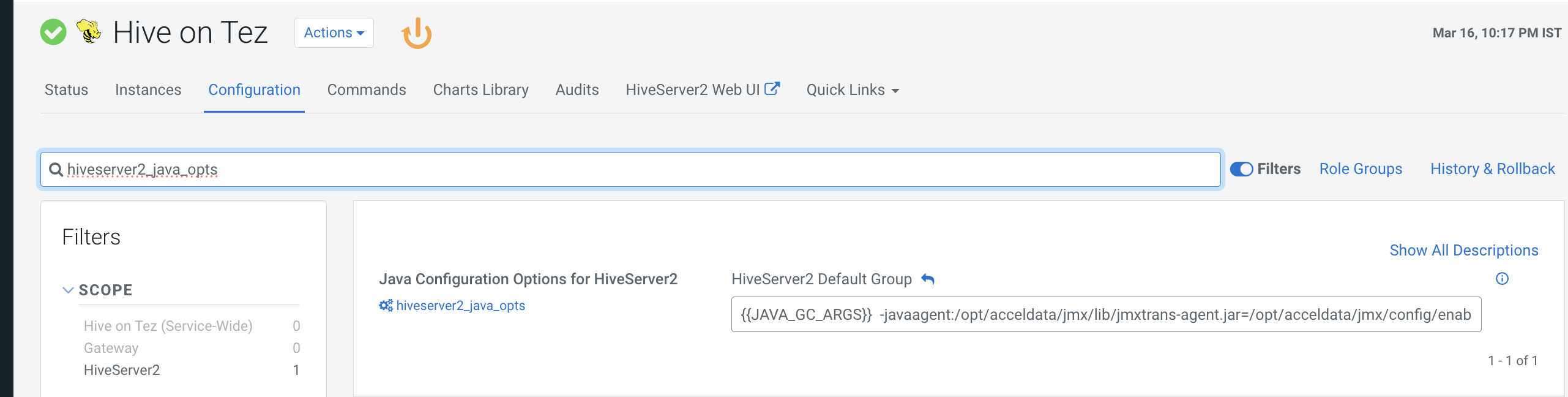
Hive on Tez
- In the CM UI, navigate to Hive onTez > Configuration.
- Search for hivesearver2 _ java_opts and update the following value in Java Configuration Options for HiveServer2.
- Update or append the property with the following values:
{{JAVA_GC_ARGS}} -Dorg.jmxtrans.agent.util.logging.Logger.console=stderr -Dorg.jmxtrans.agent.util.logging.Logger.level=WARNING -javaagent:/opt/acceldata/jmx/lib/jmxtrans-agent.jar=/opt/acceldata/jmx/config/enabled/vm_hive_server.xml
Have a suggestion?