
Troubleshooting ODP
This section helps you with solving and configuring common issues related to component installation in ODP.
Management pack Installation
- If any Mpack installation is failing with following error:
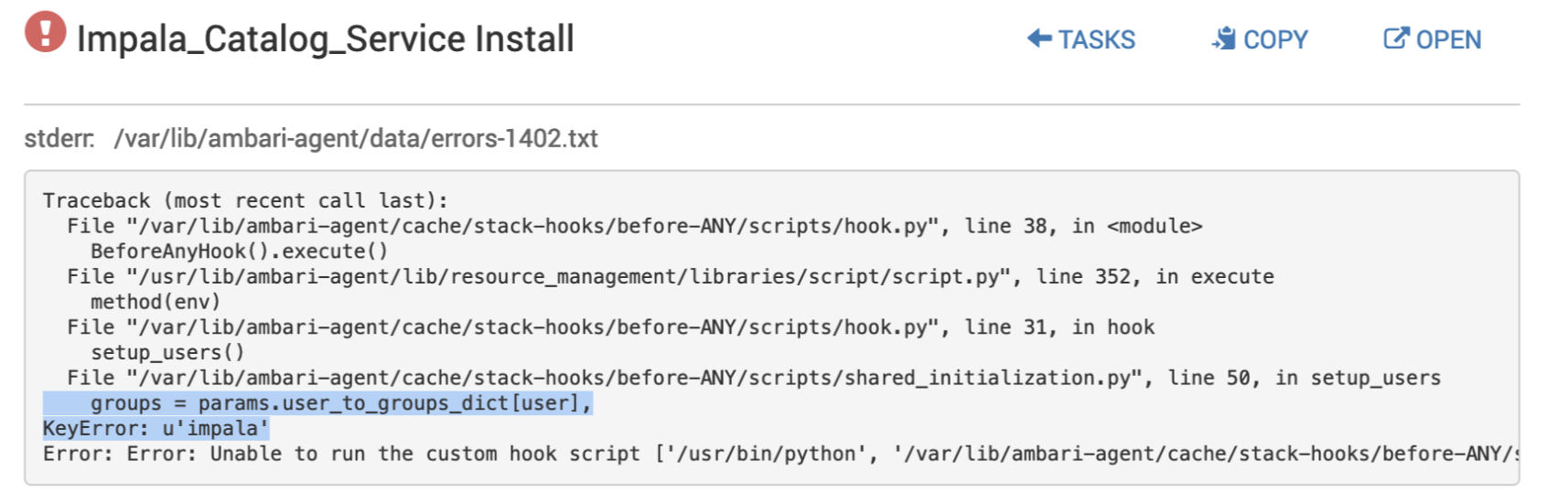
run the following command before installing impala:
/var/lib/ambari-server/resources/scripts/configs.py -u admin -p admin -n [CLUSTER_NAME] -l [HOSTNAME_FQDN] -t 8080 -a set -c cluster-env -k ignore_groupsusers_create -v true
Impala
- Update/add these configurations respectively for smooth impala installation :
Pre-installation > Update in impala-env, if not set :
enable core dump = true
is_coordinator = true
is_executor = true
Post-installation > Add custom properties in hadoop core-site :
hadoop.proxyuser.impala.groups=*
hadoop.proxyuser.impala.hosts=*
Ranger
- If KMS ranger policy fails to create. Perform the following steps:
- Remove the empty KMS policy folder from CLI
- Restart Ranger from Ambari UI
- Then, Restart Ranger KMS from Ambari UI
- When enabling Hive Ranger plugin**,** add following service level configurations manually to policy to enable Ranger service for Hive :
Name | Value |
|---|---|
tag.download.auth.users | hive |
policy.download.auth.users | hive |
policy.grantrevoke.auth.users | hive |
enable.hive.metastore.lookup | TRUE |
hive.site.file.path | /etc/hive/conf/hive-site.xml |
ambari.service.check.user | ambari-qa |
- In case of using Kafka in kerberized env, add following service level configurations manually to policy to enable Ranger service for Kafka :
Name | Value |
|---|---|
security.protocol | SASL_PLAINTEXT |
tag.download.auth.users | kafka |
policy.download.auth.users | kafka |
sasl.mechanism | GSSAPI |
bootstrap.servers | <bootstrap_servers_with_port> |
kafka.keytab | <kafka_keytab> |
kafka.principal | <kafka_principal> |
- If service repo creation fails with missing rangerlookup user, create rangerlookup user manually from Ranger UI.
Kerberos
- There are some depreciated encryption types in ubuntu 20.04 :. Thus, Update in ambari - Kerberos → Advances kerberos-env → Encryption TypesNew Value : aes des3-cbc-sha1 OR during ODP installation on Ubuntu 20.04, modify ambari-server.deb by editing Encryption Types Value to ‘aes des3-cbc-sha1’ in
/var/lib/ambari-server/resources/stacks/ODP/3.0/services/KERBEROS/configuration/kerberos-env.xml
- When using kerberized cluster, update the following properties to avoid Error 401 while accessing Hadoop services web UIs : Ambari. UI → HDFS → Advances core-site
hadoop.http.authentication.simple.anonymous.allowed=truehadoop.http.authentication.type=simple``
Knox
- When installing knox, update hadoop.proxyuser.knox=* in HDFS > Advancved > custom core-site, and restart HDFS.
- While accessing oozie with Knox, add following to Oozie > Advanced Configs > Custom Oozie-site : oozie.service.ProxyUserService.proxyuser.knox.groups=*oozie.service.ProxyUserService.proxyuser.knox.hosts=*``
- Oozie UI requires additional “/“ to access Knox UI .
Zookeeper
- If Zookeeper installation is failing with following error, add the given config: Ambari. UI → Zookeeper → Advances core-siteCustom zoo.cfg : admin.serverPort=9876
2023-09-21 14:05:01,535 - ERROR [main:ZooKeeperServerMain@81] - Unable to start AdminServer, exiting abnormally
org.apache.zookeeper.server.admin.AdminServer$AdminServerException: Problem starting AdminServer on address 0.0.0.0, port 8080 and command URL /commands
at org.apache.zookeeper.server.admin.JettyAdminServer.start(JettyAdminServer.java:111)
at org.apache.zookeeper.server.ZooKeeperServerMain.runFromConfig(ZooKeeperServerMain.java:145)
at org.apache.zookeeper.server.ZooKeeperServerMain.initializeAndRun(ZooKeeperServerMain.java:108)
at org.apache.zookeeper.server.ZooKeeperServerMain.main(ZooKeeperServerMain.java:66)
at org.apache.zookeeper.server.quorum.QuorumPeerMain.initializeAndRun(QuorumPeerMain.java:129)
at org.apache.zookeeper.server.quorum.QuorumPeerMain.main(QuorumPeerMain.java:83)
Caused by: java.io.IOException: Failed to bind to /0.0.0.0:8080
at org.eclipse.jetty.server.ServerConnector.openAcceptChannel(ServerConnector.java:349)
at org.eclipse.jetty.server.ServerConnector.open(ServerConnector.java:310)
at org.eclipse.jetty.server.AbstractNetworkConnector.doStart(AbstractNetworkConnector.java:80)
at org.eclipse.jetty.server.ServerConnector.doStart(ServerConnector.java:234)
at org.eclipse.jetty.util.component.AbstractLifeCycle.start(AbstractLifeCycle.java:73)
at org.eclipse.jetty.server.Server.doStart(Server.java:401)
at org.eclipse.jetty.util.component.AbstractLifeCycle.start(AbstractLifeCycle.java:73)
at org.apache.zookeeper.server.admin.JettyAdminServer.start(JettyAdminServer.java:107)
... 5 more
Caused by: java.net.BindException: Address already in use
at sun.nio.ch.Net.bind0(Native Method)
at sun.nio.ch.Net.bind(Net.java:461)
at sun.nio.ch.Net.bind(Net.java:453)
at sun.nio.ch.ServerSocketChannelImpl.bind(ServerSocketChannelImpl.java:222)
at sun.nio.ch.ServerSocketAdaptor.bind(ServerSocketAdaptor.java:85)
at org.eclipse.jetty.server.ServerConnector.openAcceptChannel(ServerConnector.java:344)
... 12 more
Spark2
Note
During the installation of Spark2, if the user interface displays "installing Livy3" instead of "Livy2," it is a typographical error on the UI front and can be disregarded.